
I used to learn Python, but I haven't really used it recently because I've been working on Java Spring web projects.
This time, revisiting it brought back a lot of memories.
Therefore, I am writing this post to thoroughly review and reinforce the key concepts.
I. Overview
It's important to consider what you want to achieve with Python and how you plan to use it.
ProgramIt encompasses a wide range of software found on computers and smartphones, including YouTube, messaging apps, phone applications, and KakaoTalk. Programmeris Programming languages (C, C++, C#, Java, Python, Javascript, etc.)We will create the program using this technology. The programming language is: Compiler languageWow Script languageIt is located there. PythonIt is a free and open-source library that offers a wide range of powerful external libraries and is easy to use. It is based on Python. VariableThis is a concept used when it is difficult to remember the address (memory space) where data is stored. When assigning variable names, various rules can be applied, but generally, numbers cannot be placed at the beginning, and underscores (_) can be used. The `print()` function is used in Python to display the results of a specific logic, and the `input()` function allows the user to enter values (data). In Python OperatorsThese operators are primarily arithmetic, comparison, and logical operators, each with a specific priority. Like other programming languages, Python Data type (data type)This While they exist, these data types undergo automatic conversion and are not explicitly declared. The data types include numbers, strings, and booleans. Strings offer useful functions like `len()`, `upper()`, `lower()`, `isupper()`, `islower()`, and `count()`, among others.
II. Programming Languages and Python
What is a programming language?
The program is Software, application, app, application programThis is the same term. Programming languages are used by programmers to create programs, and examples of such programs include YouTube, messaging apps, phone applications, KakaoTalk, Excel, Korean language processing software, and Chrome. Programming languages are a type of language that computers can understand, similar to the Korean language that we use for communication. Examples include: Compiler languageWow Script languageThese can be categorized as: * **Compiled languages:** These languages involve a compilation process, where the source code written by a programmer is translated into machine code by a compiler. Compiled files (*.exe, *.class, etc.)You can run the program and use its features, with the most prominent languages being: C, C++, Java, C# It has a back.
Script languages are Interpreter languageKnown as "interpreted language," it reads and executes source code line by line without requiring a separate compilation process. A prominent example is Python, JavaScript, Perl It has a back. Compilation processTo elaborate further, computers can process binary files, which are composed of 0s and 1s, but the source code written by programmers is in a human-readable language. ASCII codeThis is achieved through a translation process. Therefore, scripting languages, which do not require a compilation step, are easier to modify, while compiled languages, even after compilation, are difficult to modify. However, compiled languages offer faster execution speeds compared to scripting languages. In the past, there was a significant difference in the ability to handle large datasets, but recently, the development of hardware has made scripting languages sufficiently fast for this purpose.
2. What is Python?
Python is a scripting language developed by Guido van Rossum, a programmer. It currently holds the top spot in terms of usage in 2023.
Advantages of PythonIt is a free and open-source platform that is easy to use and offers a wide range of powerful external library features. It is also suitable for web development environments. DisadvantagesBecause it is a scripting language, it is slower than other languages, has limited support for mobile computing, and can be difficult to use when it comes to hardware control. However, Recent features of the library's powerful capabilitiesBecause it can easily combine and utilize various data, it effectively addresses many of the drawbacks, making it less noticeable. There are many libraries available in the field of mobile computing, specifically related to hardware control. Instead of viewing these as weaknesses, it's more accurate to consider them as areas where certain languages may be less developed compared to others. Furthermore, there are many libraries available for use in cloud security monitoring.
The reason for using Python in cloud computing and cloud security management is to streamline and automate the tasks required for efficient operations. AutomationThis is because it makes it easy to create programs. It is particularly effective in creating and using individual automation programs, without the need to develop and distribute specific programs. And, since it uses a language we can understand It is easy to modify and has excellent transplantability, and the code writing is simpler and easier than using a compiled language. And also, Available powerful external libraries Therefore, using automation programs in cloud security management and performing related tasks is easy with Python.
3. Utilizing Python
This section involved practical exercises where we actually wrote code and used Python.
The content described above is a summary of the theoretical aspects, and I intended to present it in a report or academic paper format.
IDLE, Windows command prompt, NotepadI used [specific tool/method], but later I found that server monitoring was Linux environmentThis helps familiarize you with it in advance, which is beneficial. Tools like PyCharmWe did not utilize that feature.
I recommend checking out some other well-written articles on this topic – there are many available for you to reference! 😉
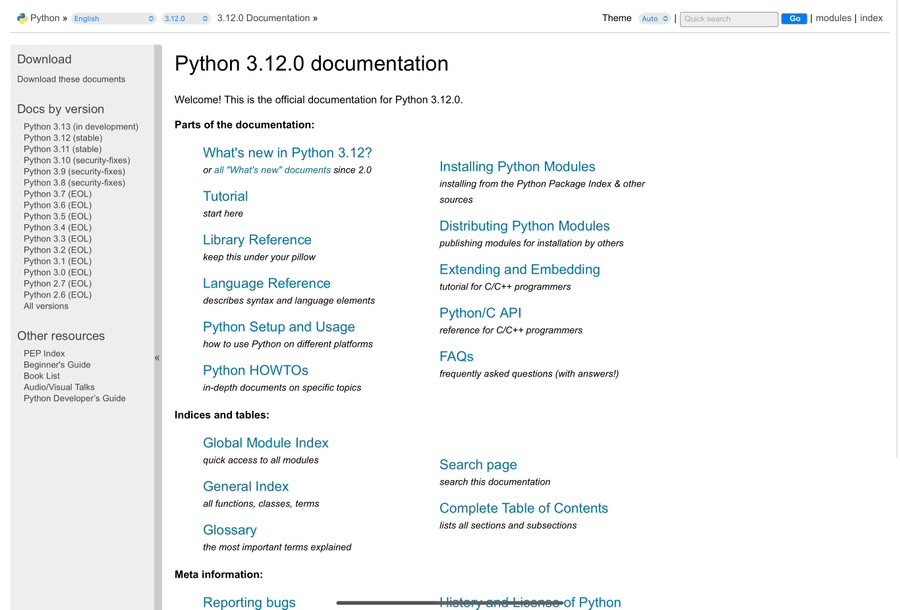
Once you enter here, you can view detailed explanations of various Python functions!
https://docs.python.org/3/index.html
Ⅲ. Python Variables and print(), input(), int()
What is a variable?
About computers Memory spaceThis is a space used to store values. A simple example: think of data as food, and a variable as the container that holds the food.
a = 100
b = 200
Unlike the algebraic equations learned in childhood, as shown in this example, the variables are declared with the variable name on the left and the value to be assigned on the right. As another characteristic of Python related to variables, which is different from other languages, will be discussed later. Data type (data type)There is no need to declare it. Simply use the variable name and assignment operator (=) to assign a value. Automatic format conversion I will explain it.
Data types are extremely important in programming languages because they determine the amount of memory a computer uses for each type of data.
Therefore, languages like C and Java have features that...
It should always be explicitly stated!
Furthermore, variables can not only store values, but also the results of arithmetic operations such as +, -, *, and /. We will discuss this in more detail in the section on operators. Additionally, there is a unique feature of Python when declaring variables.
a, b, c = 1, 2, 3
list = 1, 2, 3, 4
variable = "안녕"
variable = "난 파이썬"
When you declare variables like this at the top, as shown above, the values 1, 2, and 3 are assigned to the variables a, b, and c, respectively. When you declare them like a list, ArrangementThat's possible!
※ Arrays are incredibly important in programming, and we'll be covering this topic in a future post, so please look forward to it!
If you declare a variable, the last value assigned to it remains, and the previous values are reset. Therefore, if you want to use both "Hello" and "I am Python," it's best to declare separate variables for each or use "Hello" before assigning "I am Python."
2. Naming Variables
The variable names are, by default English and numbersIt utilizes [the specified technology/method/tool]. However, the key point here is that we cannot start with numbers!
And in Python, variable names are... "_(Under the surface)"It can be used and supports both uppercase and lowercase letters. The underscore (_) can also be used at the beginning of the variable name and in any position. Reserved wordsI can't use this feature because it requires reserved words. Words that are already defined in the Python syntax.It is.
True | False | None | if | else if |
otherwise | continue | pass | finally | def |
for | while | with | attempt | except |
pause | class | return | import | as |
Besides the types mentioned above, there are many other reserved words. However, you don't need to memorize them; as you become more familiar with coding, you will naturally learn them.
While there is no length restriction for variable names, it is advisable to create variable names that make the data easy to understand, and to establish your own rules using underscores, capitalization, and numbers in variable names. This allows for easy identification of the data, and shorter names are even better. For example:
phone = 01012345678
name = "홍길동"

def move():
The `def` keyword is used to declare a function. While we'll cover functions in more detail later, it's important to note that the function name, just like variable names, should be chosen carefully. Using verbs can be a good strategy.
So, let's think about how to name variables based on the class, function, or data they belong to! 😊
※ In Python, it is unusual but possible to declare an existing function name as a variable. However, if you declare it as a variable, the variable name will take precedence over the function name, causing it to lose its original functionality. Since it is a built-in Python function, it will work normally again when re-executed, but it is not recommended to declare the function name as a variable!
3. print(), input(), int()
print(), input(), int()This is one of the first things you encounter when learning Python. Basic built-in functionsIt's a pre-defined function created by a Python language developer to perform a specific task. We'll discuss functions in more detail later, but for now, think of them as similar to the functions you learned in math class when you were younger. Some people might find math difficult, so... For example, imagine a magic box that functions in a specific way. If you input a particular value (x) into the box, it produces a corresponding output (return). This is the basic way a function works, and both 'x' and 'return' can be declared as variables. If you put an apple ('x') into the magic box, it's like having 3 apples ('return').
`print()` is the function responsible for displaying output. `input()` is the function used to directly receive data from the keyboard. `int()` converts the input value or a specific value into an integer. In terms of code:
print("Hello, World!")
출력값: Hello, World
input("입력해주세요")
안녕하세요
입력값: 안녕하세요
int(3.14)
바뀐값: 3
Essentially, you can use this format: `print, input, int` followed by parentheses, where the data you want to display, input, or modify is placed inside. This data is referred to as an argument. The `print()` function can accept multiple arguments. A unique feature of the `print()` function is
print("난")
print("파이썬")
print("열심히 해보자구")
결과 =>
난
파이썬
열심히 해보자구

print("난", end="")
print("파이썬", end="")
print("열심히 해보자구", end="")
결과 => 난파이썬열심히 해보자구
The results are like this because of the final parameter. This parameter, even if not explicitly set, inherently causes line breaks. The line break is achieved by removing the default value `end="\n"`, which prevents line breaks from occurring. EscapeWe will discuss this in more detail later.
The `input()` function pauses the execution of the code until the user enters a specific value. The `int()` function converts floating-point numbers and strings into integers, and can be used in conjunction with the `input()` function.
num = int(input("정수를 입력해주세요"))
입력 대기...
1234
입력값 => 1234
You can declare variables to directly use the input values, and you can include a message within the parentheses of the `input()` function to prompt the user for a specific value. However, it's important to note that if the input value cannot be converted to an integer (e.g., "abc" or 2.1234), the `int()` function will not be able to perform the conversion. Furthermore, as shown in the previous example, you can individually input decimal numbers into the `int()` function, which will convert them to integers.
Ⅳ. Python Operators
In fact, there are many well-organized and excellent resources available regarding operators.
Therefore, this article will simply list and move on from the different operators.
Arithmetic operators
+, -, *, / => These are the addition, subtraction, multiplication, and division operators. They are the same as the basic arithmetic operations in standard mathematics.
a = 10
b = 20
a + b 결과 => 30
a - b 결과 => -10
a * b 결과 => 200
a / b 결과 => 0.5
A noteworthy aspect of this is that, as previously mentioned, Python automatically converts data types. Therefore, when integers are divided, the result is also treated as a floating-point number.
Basic arithmetic operations and other operators: //, %, ** => There are division (quotient), remainder, and exponentiation operators.
a = 8
b = 5
a // b 결과 => 1
a % b 결과 => 3
a ** b 결과 => 32768
// The division operator returns the quotient. The '%' operator returns the remainder after division. The "**" operator raises the number on the left to the power of the number on the right. For example, if the number on the left is 8 and the number on the right is 5, then 8 is raised to the power of 5.
2. Compound assignment operators
The standard assignment operator is "=". It's also worth noting the existence of compound assignment operators, which come in different types.
= | num = num + 10 | num = num + 10 |
= | num = num - 10 | num = num - 10 |
*= | num *= 10 | num = num * 10 |
= | num = num / 10 | num = num / 10 |
= | num //= 10 | num = num / 10 |
%= | num = num % 10 | num = num % 10 |
= | num = 10 | num = num raised to the power of 10 |
This is how it works. Because Python variables can be reassigned with the same name, if a variable named "num" has the value 10, you can use that value directly for calculations and then assign it back to the "num" variable.
3. Comparison operators, logical operators
Comparison and logical operators are organized in a table for clarity.
Operators | Meaning | Explanation |
== | Similar | If the two values are the same, the result is True. |
does not equal | They are different. | If the two values are different, the result is true. |
> | Large | If the left side is larger, then it's true. |
< | Small | If the left side is smaller, then it's true. |
>= | It is either large or similar in size. | If the left side is greater than or equal to the right side, then the result is true. |
<= | It's either small or similar. | If the left side is smaller or equal to the right side, then the result is true. |
Operators | Meaning | Explanation | Example usage |
and | And also | Both must be true for the statement to be valid. | (number) > 10) and (num) < 20) |
or | Or | If at least one of these statements is true, then the overall statement is true. | (num is equal to 10) or (num is equal to 20) |
no | Negative | Truth is a lie, and a lie is the truth. | not num < 100) |
This is an operation that returns a result of either True or False. It is useful for conditional statements like if, elif, and else, which will be discussed later.
While there are operator precedence rules, you don't need to memorize them completely. Since this is related to cloud security management, you can learn them as you go. Also, since parentheses have the highest priority, understanding them is sufficient. Since priority determines the order in which operations are performed, you can use parentheses to customize your code accordingly! Just make sure you understand this point!
※ Tip: In Java or C, the increment and decrement operators (i++, i--) do not exist in Python.
V. Python Data Types
Data types refer to the kind of variable. There are four main types: Integer, floating-point number, string, booleanThere are several data types, including integer, floating-point number, string, and boolean. The `type()` function can be used to determine the data type of a variable.
a = 10
b = 1.2
c = "파이썬"
d = True
print(type(a))
결과 class 'int'
print(type(b))
결과 class 'float'
print(type(c))
결과 class 'str'
print(type(d))
결과 class 'bool'
This can be verified.
To reiterate, Python is Data types are automatically converted.It can be done. However, for other languages, direct type conversion is required, which is Type castingThis is because when data is automatically converted, it follows the larger data format. While other data types are important, the fundamental data type for exchanging data on the web is strings. Therefore, There are many built-in functions for working with strings. len(), upper(), lower(), isupper(), islower(), count(), find()There are also many other special characters, and one of them is the escape character. In Python, you need to use either single quotes or double quotes to declare a string. In addition to the newline character `\n`, which was discussed in the `print()` function above, there are also the tab character `\t` and the backspace character `\b`. As you can see, there are specific characters with special meanings. What if you want to use single or double quotes as regular characters?
print("\"")
결과 => "
print('\'')
결과 => '
Here's how it can be used: - Backslashes can be used to add meaning to characters like 'n', 't', and 'b', but they can also be used to remove meaning from characters that already have meaning, such as "'".
Some useful string functions that are easy to learn and already well-organized can be explained briefly as follows:
len("hello")
결과 => 5

str = "abc"
str.upper()
결과 => ABC

str = "ABC"
str.lower()
결과 => abc

str = "ABC"
str.isupper()
결과 => True

str = "abc"
str.islower()
결과 => True

str = "안녕, 난 파이썬이야. 예전에 배웠지만 이번에 다시 파이썬 복습하고 있어"
str.count("파이썬")
결과 => 2

str = "완전 처음 파이썬"
str.find("완전")
결과 => 0
These functions are used as follows: `len()` returns the length of a string, `upper()` converts a string to uppercase, `lower()` converts a string to lowercase, `isupper()` checks if a string is in uppercase (returning True or False), and `islower()` checks if a string is in lowercase (also returning True or False). The `count()` function tells you how many times a specific character appears in a string, and the `find()` function tells you which position a specific character appears in a string. If the `find()` function doesn't find the character you're looking for, it returns -1.
Review
It was great to be able to recall parts I had previously learned but had forgotten, and the fact that I could review them again through these blog posts has definitely helped me retain the information. While the theoretical aspects can be a bit tedious, 🥲 I'm really looking forward to the practical sessions where we'll actually be coding and creating games. 😃