
Ⅰ. Overview
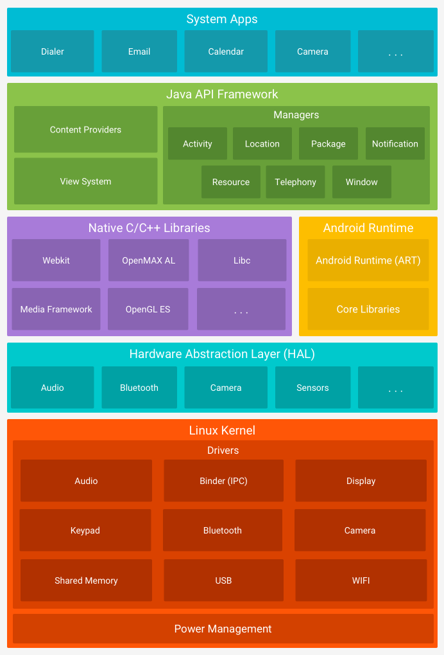
AndroidLet's take a look. Android, based on Linux and Java, extends from the Linux kernel layer to the Hardware Abstraction Layer (HAL), Native C/C++ Libraries, the Android Runtime, the Java API Framework, and the System Apps layer. Let's explore what each layer does and how it works. Linux KernelIt manages and controls the entire system, including hardware, networks, and file system access. HALIt provides a standard interface to the hardware capabilities of the device through the Java API framework. Native C/C++ LibrariesIt enables the use of FreeFont (font), Webkit (browser engine), Media (codec), and SQLite (lightweight DB). Android RuntimeIt enables Android applications to be used by the operating system. Java API FrameworkIt includes the Activity Manager (Telephony, Resource, Notification, etc.), Content Providers, and the View System, and provides an interface for hardware control. Application layerIt is divided into system and user applications. System applications are apps that can be managed with the highest user privilege (root), such as calls and messages. User applications can be managed by ordinary users, such as KakaoTalk and Naver.
Ⅱ. Android
Linux Kernel and Hardware Abstraction Layer (HAL)
AndroidAndroid is an operating system designed for mobile devices. It is based on the Linux kernel and, more recently, Kotlin, a programming language based on Java. Native Development Kit allows for development in C and C++ on Android.
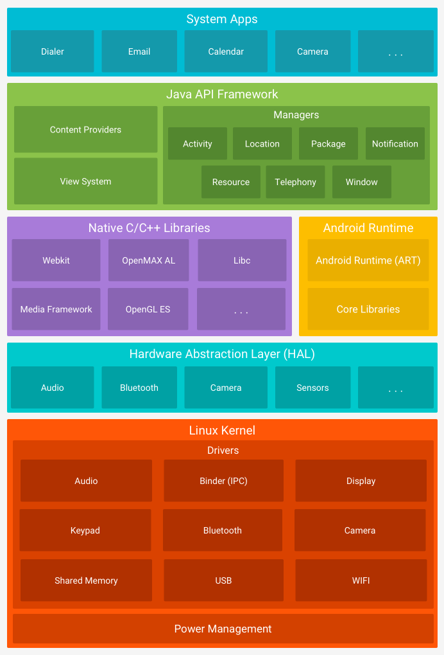
Android generally follows this structure, as shown below: Linux Kernel LayerLet's take a look. As an operating system developed on top of the Linux kernel, the kernel is similar to other operating systems in that it Manages and controls the entire system, including hardware, networking, and file system access. There are more detailed features such as security settings, memory management, power management, network system management, and device (Bluetooth devices, network devices, batteries, AP chips, multiple sensors, etc.) driver management. HAL (Hardware Abstraction Layer) layerThere is. HAL stands for Hardware Abstraction Layer, which provides a standard interface to the hardware capabilities of a device through the Java API framework, much like how Windows provides multiple API interfaces for accessing hardware. As shown in the image above, It enables the use of audio or provides modules for specific types of hardware components, such as Bluetooth, cameras, and sensors.
※ The CPUs used in Android typically use RISC, but there are also Androids that use Intel-based CPUs. For more detailed information about CPUs, please refer to the following post.
[SK Shillers SeSAC Sungdong 1st Batch] CPU Architecture, Memory Architecture
Native C/C++ Libraries and ART (Android Runtime)
Next Native C/C++ Libraries layerThere is a native layer. This native layer includes the Android Native Development Kit (NDK) that was mentioned earlier. The Android NDK enables the development of apps based on C or C++ languages, and as a library, it allows the use of FreeFont (fonts), Webkit (browser engine), Media (codecs), and SQLite (lightweight DB), among others. Android Runtime layerIn simple terms, it allows multiple Android applications to run on the operating system. It was previously known as Dalvik, but nowadays ART (Android Runtime)It is called the Java Virtual Machine (JVM), and it allows bytecode that has been compiled in Java to be converted to the DEX format, packaged into an APK, and then executed. This may be difficult to understand, so let’s see how Java is compiled and executed.
2-1. JVM (Java Virtual Machine) and DVM (Dalvik Virtual Machine)
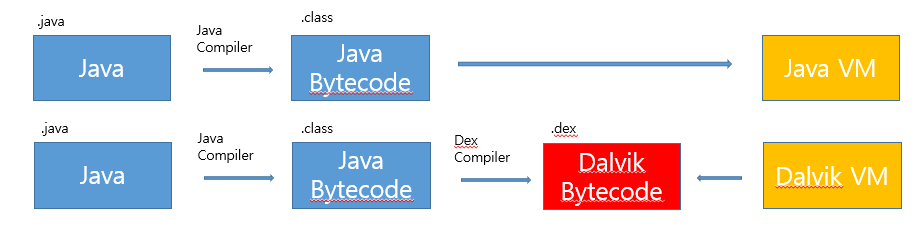
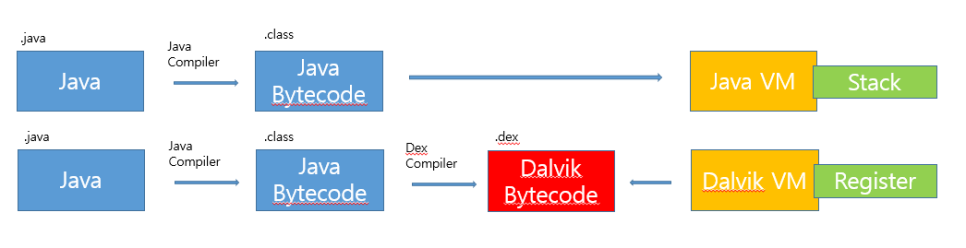
After development (coding) in Java, the Java Compiler creates Java Bytecode based on the Class. Java Virtual MachineYou can run this program, and the file that can be executed as Java bytecode is called a Jar. To see this in more detail,
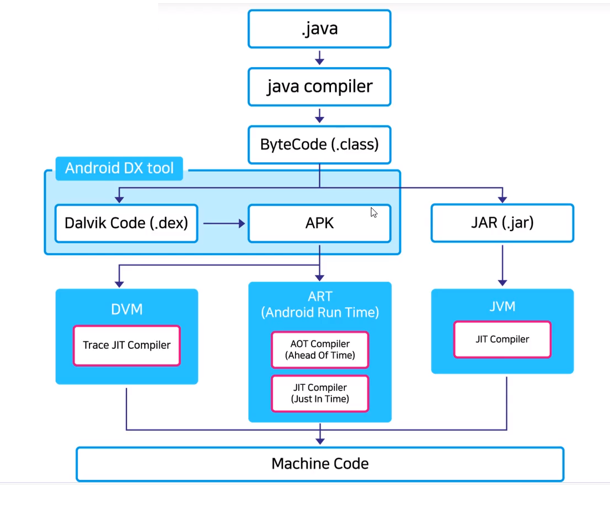
As shown in the above image, a program developed in Java is converted to ByteCode through the compiler, and if this ByteCode becomes a regular Java program JAR, Android applications are converted to Dalvik ByteCode (.dex) and then converted to APK after one more conversion. The converted JAR and APK files JVM (Java Virtual Machine)And ART (Android Runtime)Through this, we can use the application in real life, just as we would look up where we want to go using Naver Maps.
※ The JVM (Java Virtual Machine) runs between the shell and user programs (applications). For Android, it is called the Dalvik Virtual Machine and is cross-compiled. * Cross compilationIt can create applications that compile Java on platform A and run on platform B. In other words, it allows you to compile on Linux and run on Android. The JVM itself is possible on any operating system, but it has some drawbacks, making it lighter and more cross-compilable on Android. Dalvik ByteCode (specifically classes.dex)It runs applications on the Dalvik Virtual Machine.
Let's understand JVM and DVM a little more precisely. JVM is used to execute Java bytecode. Java Virtual MachineThe DVM is used to run Android applications. Dalvik virtual machineJava virtual machines are platform-dependent, meaning that
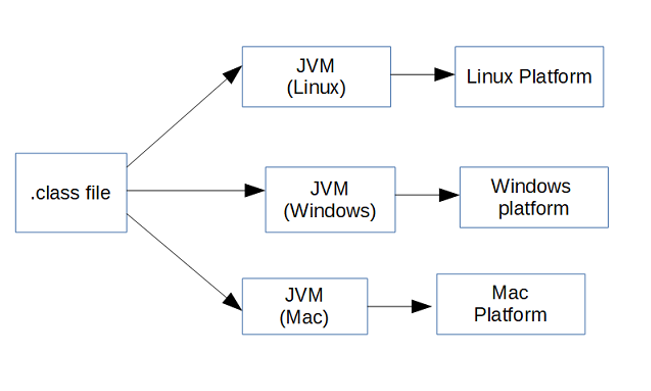
The JVM varies depending on the operating system, but Compiled Java bytecode (JAR) can be executed on any JVM. The Dalvik virtual machine is optimized for mobile device environments and designed to run on low memory. Both virtual machines are based on Java, and if you try to code in Java, you will see a .java file, which is the Java source code, and a .class file, which is the Java bytecode. The Dalvik virtual machine converts this .class file into dex and makes it executable. Another feature is
The JVM is StackAlthough based on the DVM, RegisterIt is based on the JVM, so in the computation process, the JVM uses operators similar to the PUSH and POP operators of the assembly language that we briefly discussed earlier. On the other hand, the DVM stores the operands, so it operates with simple instructions without PUSH and POP operators, resulting in fewer instructions but longer code. Just as one can understand machine code to some extent with an assembly language, one can decompile the DEX in Android to obtain Smali code (the assembly language for the Android DEX format).
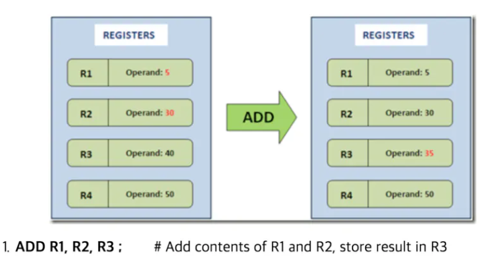
By the way, Windows is also stack-based.
2-2. ART (Android Runtime) and APK (Android Package Kit), DEX (Dalvik Executable)
ART was modified by Google to improve performance in DVM. JIT compilation processto AOT compilation processHowever, both processes are in use, and the AOT compilation is Garbage CollectionThis has been improved. Let's take a closer look at Just In Time (JIT). JIT is Dynamic TranslationIt's also called machine translation, because it translates the app into machine code at the point of first execution. Instead, The hardware is under load, which can have negative effects such as reduced battery life and CPU performance, and the execution speed is slow. However, it has low capacity and fast installation speed. AOT (Ahead of Time) Performs compilation at the time of app installation, which can reduce power consumption and improve performance by up to 2x. Instead, it has high capacity and slow installation, but it runs faster and consumes less hardware (battery, CPU). Since Android Nougat (7.0) in 2016, ART uses both JIT and AOT compilation, using JIT during installation and flexibly applying AOT as needed.
APK is for Android Files distributed in the form of a programIt has a ZIP compression structure in an extended format from the JAR format, which is a Java program. The APK package file is installed in the following paths: /data/app/package_name and /data/data/package_name. DEX Dalvik ExecutableIt is a collection of class files written in Java.
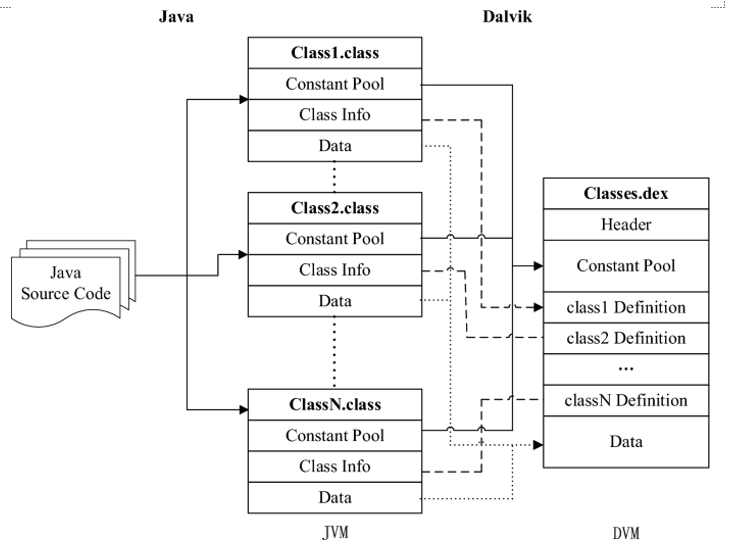
It would be easier to understand if you look at this picture. The Java source code is created by class, and these classes are combined to create Classes.dex, which is executed by the DVM.
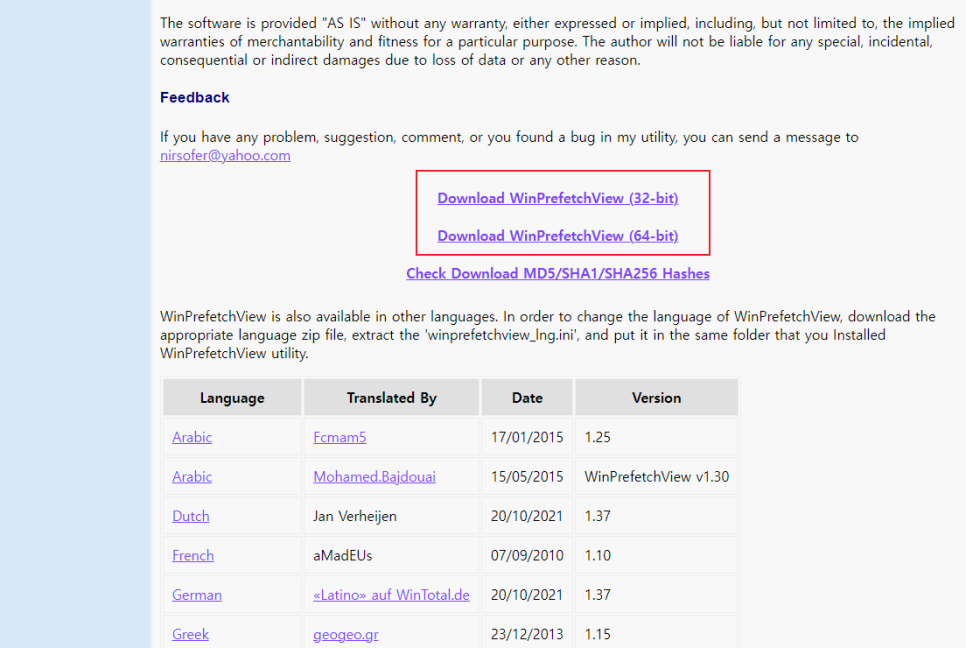
※ As I explained in a previous post, Windows has a PE structure. This PE structure allows Windows to optimize through Prefetch, which is files with the pf extension. If you optimize a program after first using it, it may run faster later. If you install and open the WinPrefetchView program on the site below, you will see several pf files. This is because even though they are the same program, they have different paths. In other words, Android DEX is responsible for application optimization. However, Android may have different paths.
View the contents of Windows Prefetch (.pf) files
3. Java API Framework and the Application Layer
I re-imported the photo of the Android hierarchy from above (it has already been downloaded too much..). Java API Frameworkwas mentioned earlier. In the HAL layer, this Refer to the framework for using the interface to enable the use of hardwareHe said that several features of the Android OS are accessed through this API, including the Activity Manager (Telephony, Resource, Notification, etc.), Content Providers, and the View System. This topic will be discussed in more detail when we describe app components at the application layer.
Application layerThe system and user applications are separated. System applications are located in the /system directory and cannot be modified by the user. When purchasing an Android phone, it is good to think of the built-in apps (phone, messaging, etc.). User applications are located in the /data directory and can be modified by the user. Each application SandboxIt is installed and cannot be influenced or communicate data individually. Only resources with the permissions of each application can be accessed, and general applications such as KakaoTalk and Naver are user applications. We can think that everything we use the app for and grant permissions to is related to the sandbox.
※ To explain the sandbox a little more, It's a kind of isolated space, an area that you shouldn't enter. Each application Separate spaceIt's natural to run there, and then enter the sandbox. It also cannot affect other applications. User apps run with normal user privileges, and system apps can only be modified or controlled with administrator privileges. Similarly, things protected by sandboxes can be bypassed with administrator privileges, and the moment this sandbox protection is broken, it is called rooting for Android phone users. Rooting allows normal users to take control with administrator privileges, and it changes the program owner, much like changing the process privileges in Linux with setuid and setgid. In other words, rooting is considered to compromise the security of the Linux kernel (you may have used the sudo su command in Linux, where su stands for switch user).
To explain sandboxes and rooting in more detail, let's move on to
Like all security features, application sandboxes are not unbreakable. However, to escape the sandbox on a properly configured device, one must compromise the security of the Linux kernel.
Even on Linux-based Android, root privileges allow you to perform all operations. Highest user levelIn fact, the manufacturer is technically the owner of the phone we purchase. Although we physically own the phone, we do not have root privileges. The reason for rooting varies from user to user, but it is generally done to gain access to the phone's root privileges. It's to fully control the device. It could be to decorate your phone with a more beautiful theme, to use a special app that can only be installed through rooting, or it could be because of developer or security-related studies or work. DisadvantagesIt also exists, Device security is compromised, making it vulnerable to malicious appsContacts, messages, and other data that should have been protected by sandboxing Another app has infiltrated and performed additional actions (such as extracting information)You can also do this if the device is damaged. become unavailable or the warranty becomes voidIt may not be possible to repair it.
※ iPhones are designed to use root user privileges from the beginning. iPhones are actually based on Linux. And just like the sandbox, they are configured to prevent other apps from being compromised. Jail BreakingSo why is the iPhone more secure? It’s because of app signing. There’s something called code signing, where developers leave a signature on the application they’ve developed, whether it’s for Android or the iPhone, through a certificate. Establish a trust relationship. However, while Android allows developers to sign, Apple does it itself on the App Store for iPhones, so unauthenticated apps cannot be used. This is said to provide better security. That’s also why Android has so many apk files floating around on the web, while iPhones don’t.
3-1. Application Components (Activity, Service, Broadcast Receiver, Content Provider)
Application Components (App Components)are essential components that an Android application must have, and they exist in separate forms, each performing a specific role. There are four components in total, and they determine how the system or the user can interact with the app. Entry pointFirst of all ActivityThere are. Activities are the entry points that directly interact with the user. User interface (UI)You just have to think about it. ServiceThe background is a versatile entry point for running apps in the background. The background refers to a series of processes such as playing music, passing time, downloading or copying large files, or communicating over a network, even when the app is not running. In other words, in Windows, controlling a program with keyboard or mouse input is called the foreground, while in Android, opening the app screen and controlling it directly with a touch is called the foreground. On the other hand, the background must be able to operate without direct control. It can operate even when the app is not running. The background does not provide a user interface.
※ This foreground, background concept applies to all operating systems.
Broadcast Receiveris a component that allows the system to deliver regularly occurring events to the app. User flow (asynchronous data streams, i.e., the form of data exchange that occurs in a continuous manner) Even when I'm using a specific app and continuing to send and receive data, most broadcasts are triggered by the system, such as when the screen is turned off, the battery is low, or a photo is captured. Regular user apps can also perform tasks, such as displaying notifications on the status bar, through broadcasts.
※ Boot Complete, which is a component of the broadcast receiver, is similar to the startup program in Windows. If malware is registered in this Boot Complete, it can keep the phone running even when it is turned off.
Finally Content ProviderA file system, such as SQLite, manages a shared set of app data stored persistently. A shared set of app data is data that is accessible to web-based or general-purpose apps. For example, a content provider manages a user's contact information, allowing general-purpose apps to provide additional functionality through the contact information.
※ It is good to know about Intent in a component, because Intent is a messaging object that can be used to request a specific action from another app component. In other words, Intent is used for communication between multiple apps or within the same app. For example, if you want to display a screen, you can use the Activity component to perform the action, and if you want it to run in the background, you can use the Service component to perform the action. You can also use the Broadcast Receiver component to deliver notifications, and send a message to request shared data through a content provider.
Ⅲ. A Simple Summary of What You Learned About Networks
This part is just a tip. The communication network is built on a national basis and is leased by telecommunications companies. In order to remain anonymous, that is, to maintain privacy, there are various networking processes that can be bypassed, such as proxies, VPNs, and SNIs. Generally, messages travel through multiple routers from the source to the destination (a technology that originated in the military). ProxyIt acts as a kind of intermediary, performing the common networking process on my behalf. So the Source IP comes out as the Proxy, and the Proxy is typically located outside the server that provides the service. VPN (Virtual Private Network)It starts from me as if there is a virtual computer outside, but it goes to the destination through this virtual computer. In other words, I am hidden by the virtual computer. There are several VPN providers, and when you use a VPN through one of these providers, the Source IP becomes the virtual computer of that provider. SNI (Server Name Indication)This is a method in which an ISP (Internet Service Provider) filters the information of the host and blocks access to harmful sites. In Korea, ISPs include SKT, KT, and LG, which means that our networking history is actually being monitored to some extent. When a regular user tries to access a harmful site designated by the government via HTTP (port 80) or HTTPS (encrypted port 443), it is blocked and returned. In other words, it is monitored and blocked in the middle before the router proceeds through the normal networking process. In the case of the source IP, it is myself.
※ Let's not enter harmful sites (or .....)
Reviews
The last week of basic training has started today. It started with the concept of mobile, and while it’s fun to see it expanding, I’m also worried that the amount of material is increasing. From tomorrow, there will be several hands-on classes, and I’m worried that I won’t be able to keep up, but on the other hand, I’m looking forward to it because it’s going to be really fun. 😁