
Ⅰ. Overview
We will look at some basic knowledge related to Android security. We will discuss static analysis and dynamic analysis. Static analysis is a technique for analyzing source code when the application is not running, and finding vulnerabilities. Dynamic analysis is a technique for analyzing the structure of Hooking or ELF executable files while the application is running, and finding vulnerabilities. The main check items for mobile applications are: first, whether the first OS tampering detection feature is enabled; second, program integrity verification; third, whether sensitive information is exposed in memory; fourth, whether sensitive information is stored in the device; and fifth, whether the authentication step is bypassed by forcing the screen to run.
Ⅱ. Various knowledge related to Android security
The main contents are Dynamic analysis, Static Analysis, MultiDexI will be doing so soon. Before that, I would like to write down a few things in the form of a review related to the previous post. So, please bear in mind that the opening paragraph may be a bit disorganized. First, just like on iOS, on Android, it is important to protect your device from malicious code apps. Developer signatureThis is necessary. Apps without signatures cannot be installed or run, and signatures are difficult to forge as the only value. Smishing (theft of personal information and money through text messages)When performing the same attack, how can we determine which device is based on the web address and whether it is actually the device being used, when the attacker is trying to extract personal information? This is something to consider when developing web applications, but also when designing operating systems. user agentSince the identifier value exists, it is possible to identify the target device and then attempt an attack. Therefore, in the operation of web services, it is possible to distinguish between mobile and PC devices using the user agent to display web pages in a responsive manner, and to deploy malware tailored to the operating system.
※ TIP: When identifying virtual Androids such as Nox Player or LD Player, we also check for additional information such as Bluetooth, carrier, and phone number.
※ From the perspective of network environment deployment, network separation can also be used to separate the internal network and the guest network to maintain security.
In the previous post, I mentioned that the iPhone is highly secure, but in fact, both the iPhone and Android are vulnerable to security breaches because they contain C language code. Especially when creating applications such as games, it is important to be careful because common C language code can be included in the development company that creates both the iPhone and Android versions. In the case of Android, C language code is executed in the Native Libraries.
I have practiced decomposing and recompiling Android APK files, analyzing and manipulating the code, and I will only provide the corresponding decomposing and compiling commands. I also attach a reference Google document on smali, the Android assembler.
java -jar apktool_2.5.0.jar(java의 디컴파일, 컴파일 도구) d(디컴파일 옵션) apk(디컴파일 할 apk명) path(저장경로 및 디렉토리명)
java -jar apktool_2.5.0.jar b(컴파일 옵션) directory(컴파일 할 소스 코드 담긴 디렉토리) -o(이 옵션 다음에 apk 저장할 디렉토리) apk(새로 만들 apk명)
Dalvik bytecode | Android open source projects | Android Open Source Project
Dalvik Executable format | Android open source projects | Android Open Source Project
Ⅲ. Static Analysis and Dynamic Analysis
Static analysiswhen the application is not running On the source codeIt is an analysis technique for finding defects. Decomplie You can analyze source code with an assembler or source code using various tools, such as apktool, jadx, and others. On Android, you can also examine AndroidManifest.xml, signature values, and other information to determine roughly which permissions are being used and whether they are malicious code. In the DEX structure, each function classes.dexbecause it is bound to
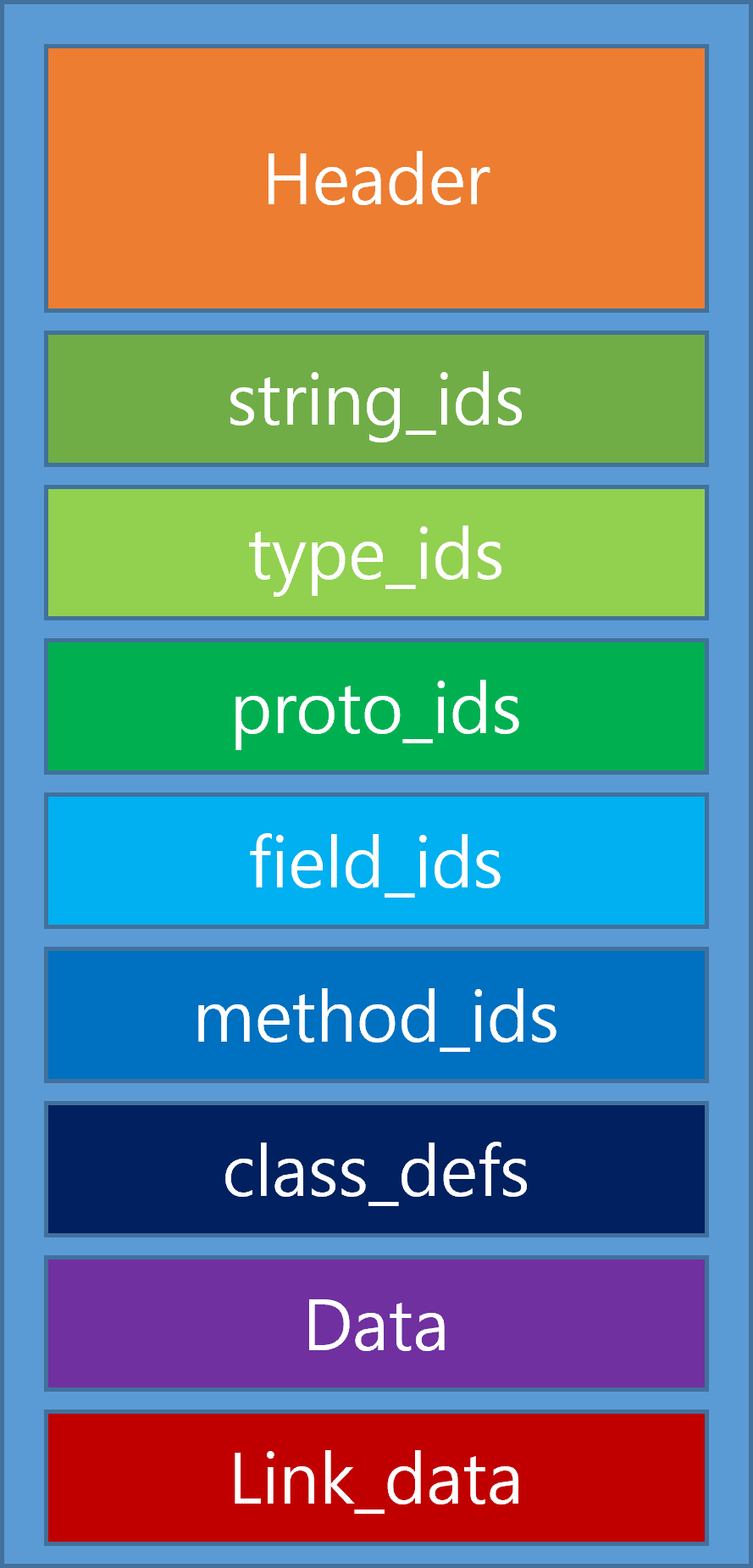
Based on this structure, we attempt to analyze the source code.
Dynamic analysisIt is an analysis technique that finds flaws in the environment where the app is running. It modifies user input or execution flow to see how vulnerabilities can be created. To modify data or execution flow in the running environment, HookingThis is necessary. Through Frida, which is well known for hooking, we can examine which classes and methods are present in the application, understand which methods are working, and manipulate them. FridaIt has some framework based on JavaScript, but you have to build the code logic yourself. JEBThere is also a commercial software called ELF (Executable and Linkable Format) so (Shared Object) extension files, which originally refer to Unix-style executable files, are often dynamically loaded on Android. These extension files are written in C/C++ and will run through Native Libraries, as they are linked to the Linux system, which is the basis of Android.
Check items | Description |
Whether the OS modulation detection feature is enabled | As security threats increase when an OS is modified (rooted or hacked) on a device, it is important to check whether the service is available when the OS is modified. |
Program integrity verification | Since there is a security threat, such as the inclusion of malware and its redistribution, if the modified program is able to run normally, it is necessary to check whether the modified program can run normally. |
Whether sensitive information is exposed in memory | Checking whether plaintext of user's sensitive information is exposed in the user's terminal memory area |
Whether important information is stored on the device | Check whether sensitive information is stored in files located in the application's user folder and external storage |
Bypass the authentication stage by forcing the screen to run | Check whether the authentication stage can be bypassed through forced screen execution, manipulation of authentication-related files, and other methods |
As you can see in the table above, there are five key items to check in a mobile application. First, OS Modulation Detectionis a check to see if the operating system has administrator privileges, which allows full control over the device. In the case of Android, Rooting, for iPhone JailbreakIf a regular user performs rooting or jailbreaking, the security system, Sandbox, may lose its functionality, making it highly vulnerable to security threats. Of course, if the administrator’s privileges are hacked due to malware, all the data stored on the device may be compromised, leading to a serious situation.
※ When using certain programs on a PC, rather than a mobile device, the program may sometimes gain high privileges in the operating system. This is because the program can be hacked to extract information from your PC, so caution is needed. For example, VMware, Nox Player, and other programs are dangerous because they can directly manipulate the kernel as a virtual machine.
So, to detect this OS modification, you can use a specific app or System configuration files (ro.debuggable, service.adb.root) You can check this, or enter the Android operating system and check whether the su command is running. Files installed during rooting (/sbin/su, /system/su, /system/bin/su, /system/xbin/su, /system/app/Superuser.apk, etc.)You can find out if they exist.
getprop | grep debugIf you enter the following command,
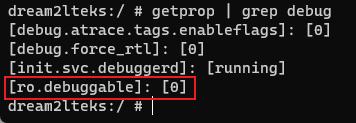
You would see results like this: if ro.debuggable is set to 0, it means that the device is not rooted; if it is set to 1, it means that the device is rooted.
Program integrity verificationThis is an area that ordinary users should be especially careful with, as it appears to be Even if it appears to be a normal application, malicious code may actually be running inside it. Caution is needed. Apps downloaded from places other than the official Google Play Store, such as the apk market, are particularly risky. IOS is relatively safe because it can only be downloaded from the App Store (Apple Store). Windows can also easily download and use programs that circulate on the web, so care should be taken as well. Once executed, the consequences can be irreversible.
Exposure of sensitive information within memoryThis is a security concern because all devices have memory that can be attacked. Virtually all applications are allocated memory, and data is stored and deleted. If someone can access this memory in real time, they can Dump memory informationIf I do, my account, password, card number, and account information could all be exposed. So the important information I entered into memory If it exists in plain text, it is a vulnerabilityand EncryptionEven if memory information is leaked, it should be made unrecognizable. This is especially important to consider on the web, as JavaScript has vulnerabilities in terms of security. If it is exposed as is, it can be dangerous. Encryption is also used when storing personal information in the DBIt must be complex and not easily decodable.
Store critical information on the deviceIn the case of the common cases, there are not many. Sensitive personal information is stored in a public directory or external storageIf that were the case, all personal information would be stolen if the device were hacked even once. In the case of games, if user data remains, it can be manipulated to enjoy the game (???), but that would be rare, not only in games but also in cases such as banks. Since we manage critical information on the server and pay great attention to the security of the server, In general, it can be considered safe. It is relatively less risky, unless the user stores sensitive information on the device separately.
Bypass the authentication step by forcing the screen to runsuch as logging in or entering a key Files related to the authentication processBy manipulating the audio, it can bypass the security measures and access user apps to extract personal information. Androidmanifext.xmlThe permissions and component settings are defined, and if the exported value is true, the service can be accessed directly by other applications or systems, and if it is false, it can only be accessed within the app. If the settings allow external access to the application, Login activityAccess it in the login activity Call another activity It can bypass the authentication steps, allowing other malicious code to run instead of the normal login-related functionality.
Ⅳ. MultiDex
MultiDexIn simple terms, it's good to think of the Dex structure as being duplicated.
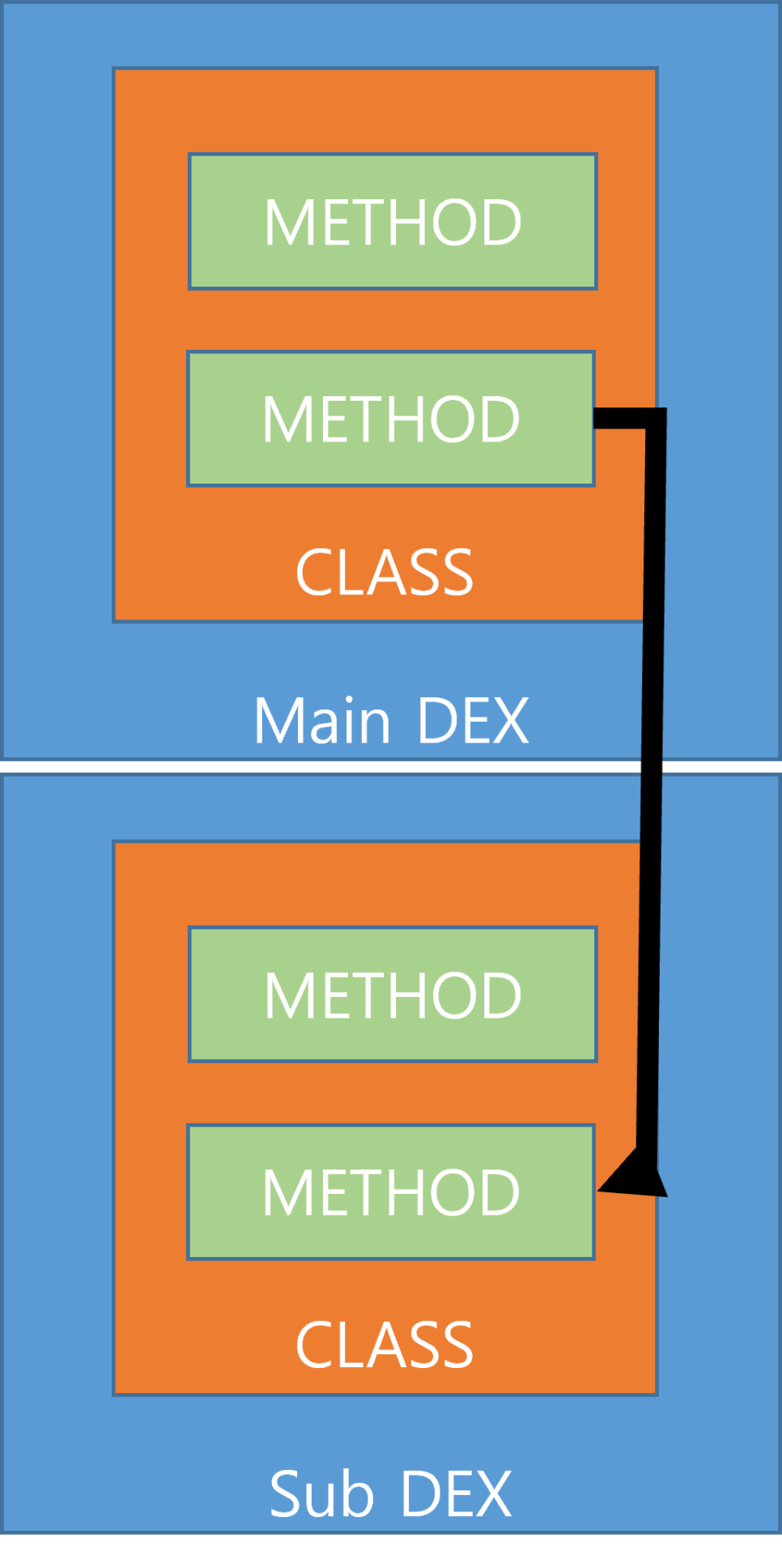
As you can see in the image above, the background for this structure is Method limitations This is not an issue when creating simple applications, but when an application offers a large number of features or uses many methods by referencing multiple libraries during development, it is limited in how many Dexes it can be composed of. 64K reference limitIt is called the 64K reference limit because it cannot exceed 65,536 methods, and the number of values is the same as 64 X 1,024. So, as shown in the image above, Main DexAnd Sub DexIt operates the application by dynamically loading each component into memory. However, there are cases where this structure is not used because of limitations, but rather because of its advantages. In the case of Sub Dex, since the codes can be hidden, The important code can be hidden in Sub Dex and executed, while the regular code can be executed in Main Dex. When decompiling an apk file with this structure, you can see that Main and Sub Dex are in different regions.
ELF (Executable and Linkable Format)Let’s take a quick look at how it is called and works on Android.
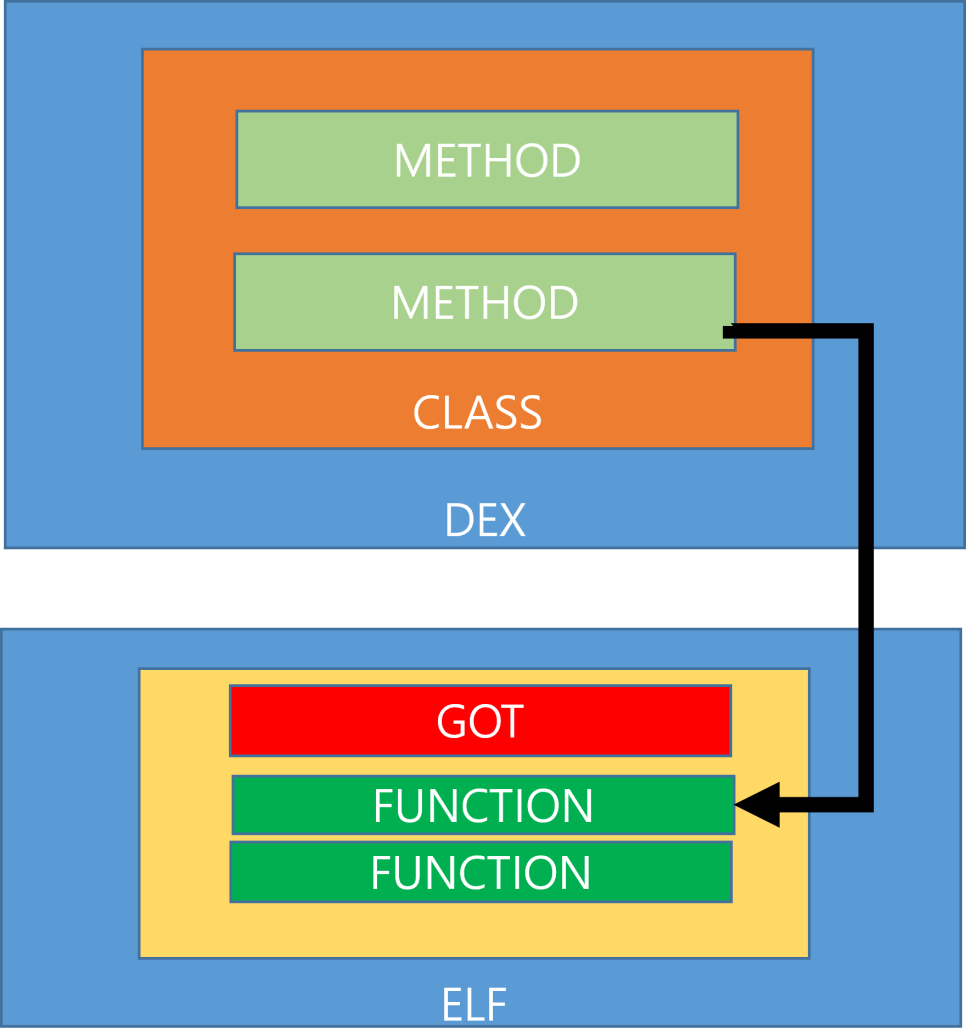
By referring to the Native Libraries in the Android structure, execute code written in C/C++, and if there is an ELF method that needs to be referenced when the METHOD of a CLASS is executed in the DEX structure, PLT (Procedure Link Table)PLT is a table that connects external procedures and stores the addresses of the procedures. GOT (Global Offset Table)The GOT is a table that contains the addresses of the procedures referenced by the PLT, and is included in the ELF file, as shown in the figure. That is, in the Android DEX structure, a CLASS's METHOD has the ELF methods that it needs to execute in its logic, and the PLT can be loaded by referring to the GOT.
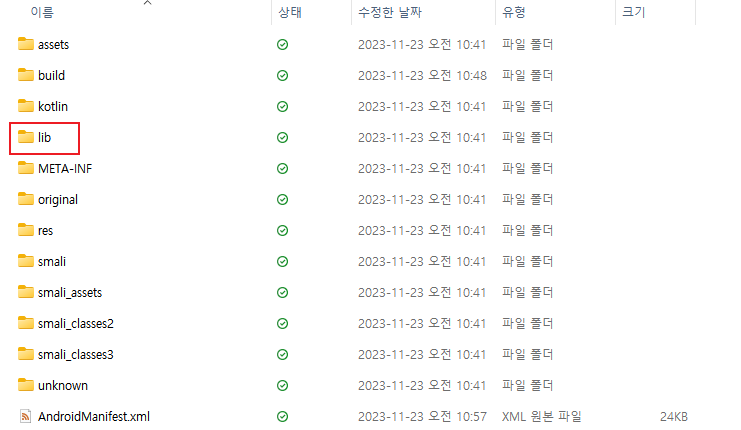
When you open the apk file, you'll see a variety of configurations, but there's also a lib directory. Inside this directory, there are ELF files. If you look inside, you'll see
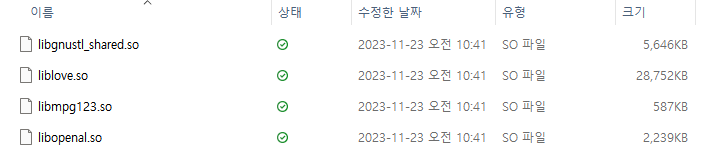
It is included in the form of lib[name].so (Shared Object). The '.so' extension refers to an executable file in Linux, and ELF refers to the executable file structure in Linux, similar to PE in Windows.
Reviews
Actually, I wrote the review first before writing this article. This week, the number of posts has decreased, especially. I think I won't be able to write anything because I'm learning hacking techniques... 😆 So I'm going to finish the vulnerability assessment section with this post. I feel a bit relieved that the number of posts has decreased. 😆