
Ⅰ. Overview
CPU (Central Processing Unit) ArchitectureLet's look at the structure. According to the design method CISC (Complex Instruction Set Computer), RISC (Reduced Instruction Set Computer)Let's see the difference. CPU Architecture of Register Introduces concepts and types. Memory ArchitectureLet's look at the structure. MMU (Memory Management Unit)The role of Virtual memory (Virtual Address)Learn about the connection structure. Explore the process of how the developed program is executed. DebuggerExplain the concepts and the parts of the practical exercises that you learned. Assembly languageThe commands and OpCode, OperandHe talks about it.
Ⅱ. CPU Architecture
CPU (Central Processing Unit)
The CPU (Central Processing Unit) plays a major role in a computer, storing, interpreting, calculating, and controlling. The focus of this lesson is not on how to build a CPU, but rather on understanding its operation and how to interpret program structures. Therefore, let's briefly cover the following related topics: first, we need to understand the Stored-program concept. All modern computers operate according to this program-internalization method, which was invented by von Neumann. As mentioned earlier, in this method, applications are stored in memory, and the CPU executes commands one line (one data) at a time. The results of the execution are recorded in memory again, and the next line of commands is retrieved and executed. This process is repeated indefinitely, which is the Stored-program concept.
CISC (Complex Instruction Set Computer), RISC (Reduced Instruction Set Computer)
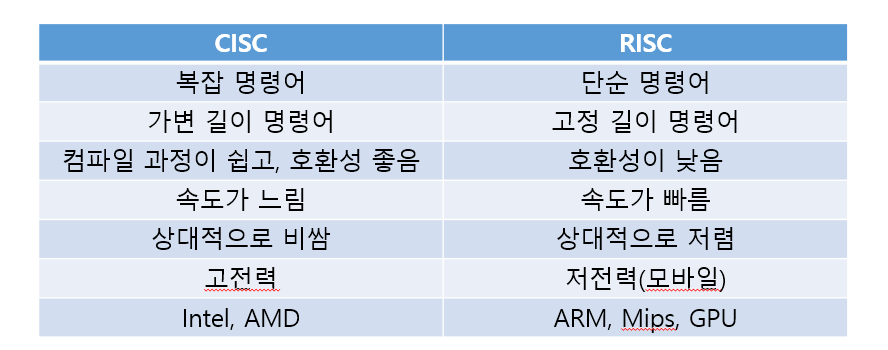
Then CPU is Stored-program concept How do we do it? CISC And RISC Design methodIt exists. CISC as shown in the table above It supports complex commands, variable-length commands, and is highly compatible, but it is slow. It is relatively expensive and consumes a lot of power. You can see this on many regular desktops Intel, AMD There is. RISC is It executes simple commands, fixed-length instructions, and is relatively fast, inexpensive, and low-power. So the things we commonly call the main chips in smartphones ARM, Mips, GPU There is.
It is good to know the difference between a processor and a process. A processor refers to a physical device such as a CPU or GPU, while a process refers to an executing program (application).
※ A CISC-based CPU is required to install an operating system such as Windows, but since the MacBook uses a RISC-based CPU, Windows cannot be used in the usual way.
Register
We said above that the CPU implements the Stored-program concept. So, depending on the CISC or RISC design, the CPU will operate. But how exactly can a program be stored, instructions (data) be executed, and the results be stored again?
That's right inside the CPU. Register Because of that. Register is a versatile storage space General Purpose Register 32-bit 8And Segment Register 16-bit 6, Program Status and Control Register 1 x 32-bit, Instruction Pointer 1 x 32bitIt is composed of
① General Purpose Register
As a general-purpose register, it stores a variety of values.
General purpose registers | Types of values to be stored |
EAX | Arithmetic computed values, function Return values |
EBX | ESI can be combined with EDI registers and stores memory addresses |
ECX | Store and execute the iteration count (counter) in a loop |
EDX | EAX Used as an aid to arithmetic operations (such as sign extension, multiplication of large numbers, division, etc.) |
ESI, EDI | When data is manipulated (string comparison) or copied, ESI stores the source data address (original data address), and EDI stores the destination address (the address to which the data will be moved after copying). |
ESP | The bottom of the Stack, where the last address is stored |
EBP | The top of the Stack, where the first address is stored |
※ We will discuss this later, but a Stack is a LIFO (Last In First Out) structure. When data is inserted, it enters last and exits first.
② Segment Register
Indicates the location of the currently executing instruction. It represents the memory address where the program's data is located.
Segment Register | Types of values to be stored |
CS | Code Segment, starting address of the code region |
SS | Stack Segment, starting address of the stack area |
DS | Data Segment, starting address of the data region |
ES, FS, GS | Data Segment, which contains the starting address of the data area, but for ES, it contains strings, for FS, additional data (data for specific purposes), and for GS, it stores data for various applications |
③ Program Status and Control Register
Control Register | Types of values to be stored |
Carry Flag (CF) | The borrowing number for addition and subtraction Borrow) Set to 1 when it occurs |
Parity Flag (PF) | If the result of the operation is even, set it to 1; if it is odd, set it to 0 |
Auxiliary Flag (AF) | 16(8) bit operations set to 1 when a carry occurs |
Zero Flag (ZF) | If the result of the operation is 0 (when equal), set it to 1 |
Sign Flag (SF) | If the result of the operation is 1 (negative, sign bit), set it to 1 |
Overflow Flag (OF) | Set to 1 if the result of the operation exceeds the capacity |
※ In the case of the Zero Flag (ZF), if the result is the same after performing a string comparison operation rather than a regular arithmetic comparison operation, it is set to 0 and 1. If it is 0, the result can be considered to be different. This register can be manipulated to change the condition of the code.
④ Instruction Pointer
IP Register as the network IP Just as an address identifies a server's location, it also identifies the address of the code (the instructions) that the program is to execute. In 32-bit systems, EIP, For 64-bit RIP That is.
※ By changing the IP Register, you can freely control the behavior of the program. RCE (Reverse Engineering): Also known as reverse engineering, it involves analyzing the code of an existing program and restoring it to its original source code. It is used for hacking (malware).
※ Vulnerability Assessment: An attacker can exploit a problem (vulnerability) in the code to cause a bug. In Windows, this can cause a blue screen to appear, or in a regular program (application), an error window to pop up. Vulnerability assessment is about how to prepare for this, and where the vulnerable parts are.
There are two types of CPU arithmetic: Big-endian and Little-endian. Big-endian is the process of calculating numbers from the highest to the lowest, as we usually write numbers. Little-endian is the opposite, calculating numbers from the lowest to the highest. Big-endian is easier to read for the human eye, but the CPU must go through a conversion process, making it slower than Little-endian. Generally, the CPU processes data in Little-endian.
Ⅲ. Memory Architecture
Memory
CPU The space where the work is performed is usually RAMJust think of it as being faster than a disk. CPU It is also a von Neumann architecture. However, because it has limited resources, it is volatile. In the past, Single Tasking was inefficient, as another program could not run until the first one was finished, wasting processor resources. However, with a single CPU Also in Multi Tasking (Multitasking)Scheduling techniques that allow for modern multitasking have become possible.
※ On Windows, the command to view the list of running processes is 'tasklist'. The PID displayed is random each time the process is executed.
It is said that parallel computing is possible through scheduling, but how is this possible when CPU and RAM are limited?
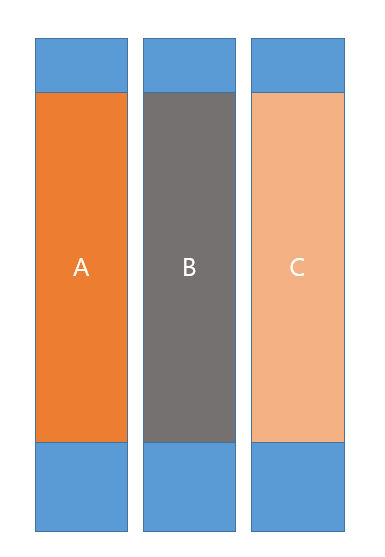
This is because of virtual memory. As shown in the picture next to it, first, virtual memory is created instead of actual memory. The virtual memory makes it appear as if each of the programs (applications) in the picture, A, B, and C, are each occupying one piece of memory. So how is physical memory used?
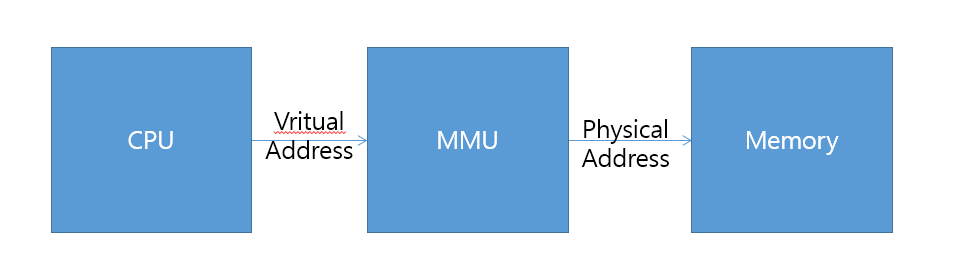
As shown in the image below MMU (Memory Management Unit)Because of its existence. MMU It maps virtual memory to actual physical memory. CPU While the process is running, it writes to memory Access (Each time it is accessed, virtual memory (Virtual Memory Address)The address in physical memory (Physical Memory Address)Map toI'll do it.
※ Although it may seem like it will be done later, in reality, memory is used not only for RAM but also for disk. In Windows, you will see Settings - System - Information (bottom) - Advanced System Settings (middle) - Settings on the Advanced tab - Advanced (virtual memory).
So let's look at how it actually works. Generally speaking, DRAMSilver Stack, Heap, The code area is a storage for multiple values in the data area, not just DRAM. SRAMIt exists. SRAM (Static Random Access Memory)is a fixed memory DRAM (Dynamic Random Access Memory)Multiple programs stored (shown in the photo above) A, B, C) Middle A When the program runs first, it is given priority CPU I allocated the registers B when the program is running, it replaces and allocates the existing registers. That is, Switching (Conetxt Switching)Do it. SRAM It is fast and expensive equipment. SRAM There are so many CPU This demonstrates the excellent performance of the system for multitasking. In conclusion, DRAM Programs running in physical memory are all stored (in multiple virtual memories) and reloaded each time they are executed. SRAM This switching allows for simultaneous (multi-tasking) operation.
In addition, for this multitasking, we mentioned earlier Scheduling techniquesused to implement this, with related techniques such as a single processor (CPU, GPU)Performing each program (process, application) in turn TDM (Time Division Multiplex)It exists.
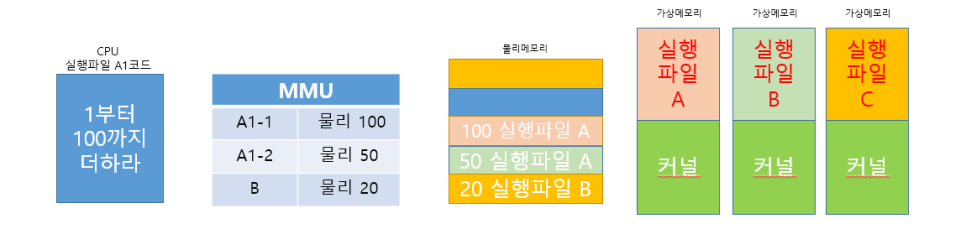
TDM The system randomly decides which virtual memory to run every few seconds. The virtual memory is switched in order, hiding physical memory from the programs that are actually running (even though it is allocated to physical memory). Page(Page)The virtual memory address space is independent with a fixed size.
If you were to develop an application in C, compile => LINKER (target code . obj) => File system (executable files, EXE etc.) => Loader (assigns application executable files to the kernel and memory) It works sequentially.
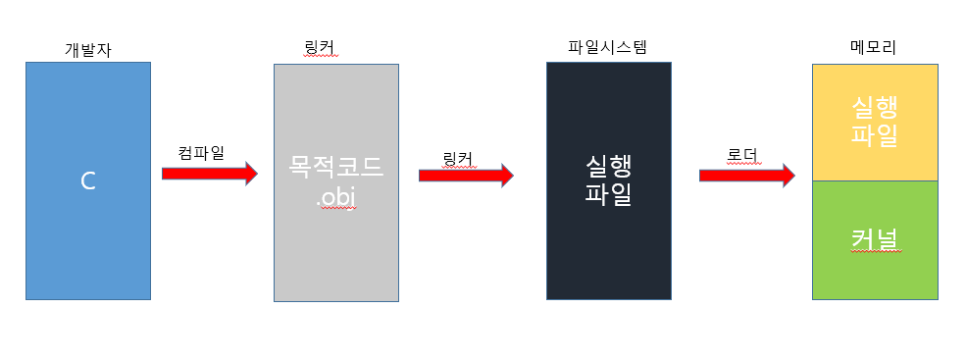
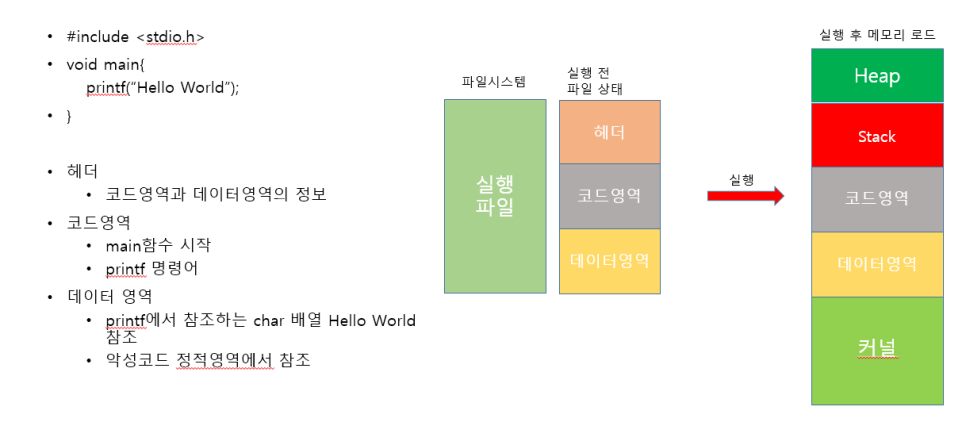
As you can see in the above image, C is a language that manages memory directly, making it easy to understand how memory is allocated and how address values are mapped. Many applications are developed in C, and executable files for Windows are also written in C. EXE)This compiler and linker Binary - This is how the various applications we use are created through a process that can be executed by a computer in machine language. The header section of the executable file is shown below. PEview As I mentioned earlier, information related to program execution (modules, IAT, EAT, It contains information such as memory.
While C is not the only language, there is code that is added by the compiler during compilation called Stub. The compiler automatically adds this code when controlling the execution flow, such as database integration, network connections, testing, or setting environment variables, or when functions that have not yet been implemented or hardware needs to be controlled.
IV. Debugger
Debugging is already familiar, as it involves finding and fixing bugs in the computer's operation. The types of executable files in Windows include EXE, SCR, DLL, SYS. They all follow the PE (Portable Executable) Format or Structure. Simply put, the PE structure defines the structure of an executable file in Windows, and you will often see EXE. SCR is a screen saver executable file, and DLL (Dynamic Link Library) is typically KERNEL32.dll. SYS is a driver-related executable file. In addition, there are BAT and PS1, which are script files that can be executed in Windows. These script files are often used through command automation coding.
※ For vulnerability detection, we often use scripts that are dependent on the operating system. For example, let’s imagine installing a separate program on the customer’s server. Is that possible? Of course, we cannot tamper with the customer’s computer, so we can say that it is not possible. While this is not always the case, it is generally true.
※ KERNEL32.dll contains definitions for all functions in the Windows application interface, and many applications dynamically reference this kernel. For more information, see the Microsoft website.
Windows Kernel-Mode Kernel Libraries - Windows drivers
※ The reason why there are files related to the execution of the SYS driver is because Windows does not have direct access to the driver and must access it through the driver API.
To explain DLL files a little more, Windows executable files contain IAT (Import Address Table)And EAT (Export Address Table)There is. For code maintenance management DLL is composed of modules, including functions and classes, that are small in size. IAT And EAT It refers to the DLL file and executes the module's functions. The executable file contains IAT First, I organized which functions in the Windows DLL files I needed to use. EAT It references and calls functions in DLL files located outside the application, and then releases them.
Debugger of Tool There are many things, and this is what I learned this time. Tool Silver GHIDRA (Gidra), Cheat Engine, HxD, OllyDbg, PEview, IDA There are others. Debugger Tool It can also be used as a hacking tool, HxD in the case of hexadecimal PE Show the files OllyDbg This time, I was able to use it to practice analyzing code through practice.
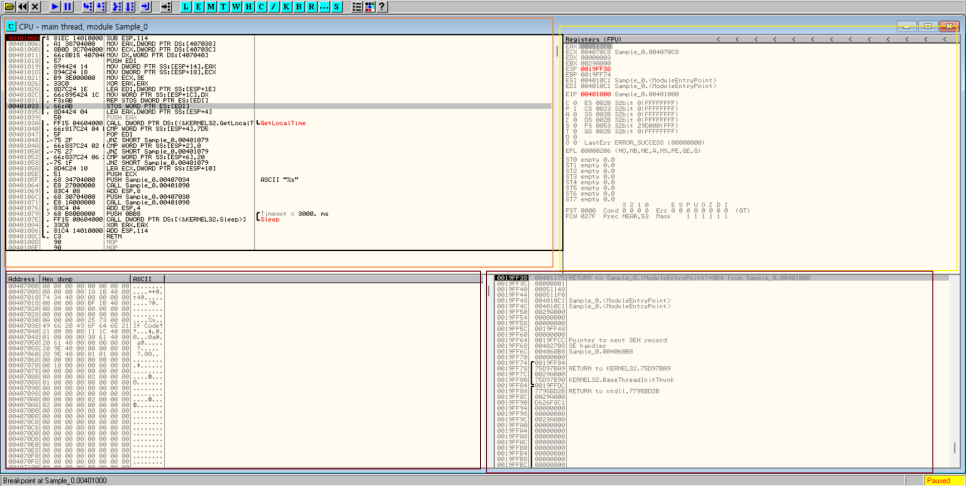
The text may be too small to see. The red part is the assembly (Assembly) Program code that operates as a commandIt's a place where you can see The right yellow part is Register part, The purple part on the right below is the stack (Stack) Region, Finally The purple area in the lower left is the memory dump This is part of it.
PEview using the program ' IMAGE_OPTIONAL_HEADER ', ' SECTION . rdata 'You can get a lot of information about the execution of the program through it. To summarize the parts we have learned, in both cases: PE HeaderIt is stated that PE Header general information related to the execution (drivers, DLL, It includes memory address information, among other things.' IMAGE_OPTIONAL_HEADER 'The part that should be noted is ' Address of Entry Point 'And ' Image Base 'That is.' Address of Entry Point 'The executable file refers to the point in memory where code execution begins after the file is mapped into memory. Image Base 'When allocated in memory, it has a reference address value. ' Image Base 'is usually EXE in which case it is 0x0040000 DLL In this case, it is 0x10000000. So the sum of the two elements becomes the starting point of the program. Additionally, ' Base of Code 'There is a start point for the code section (the entire code). Usually, this is Address of Entry Point 'And ' Base of Code 'are the same. Finally, ' Number of Data Directories 'specifies the number of data directories. ' SECTION . rdata 'It is as described above IAT It contains the content.
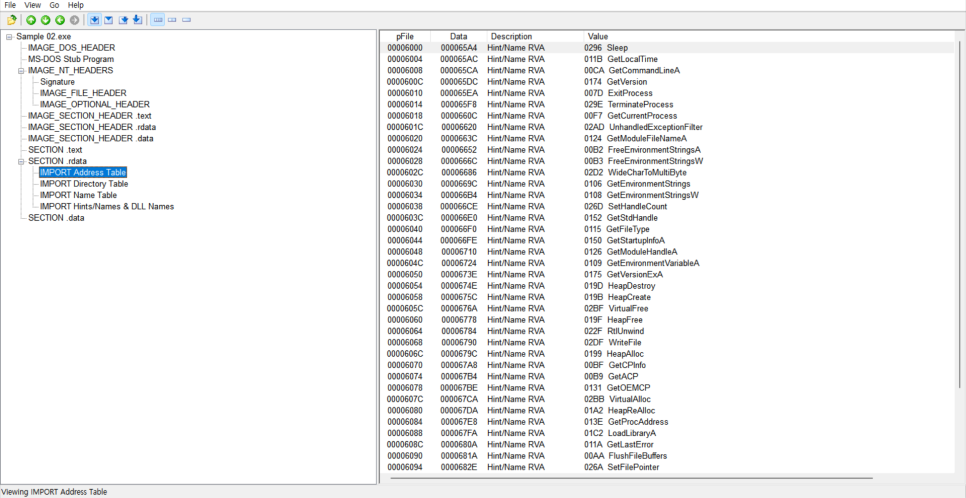
In addition, the program has not yet been fully utilized and requires further study.
Such Debugger Tool to analyze the executable file using Assembly LanguageIt would be nice to know, first of all OpCodeAnd OperandThere is. OpCode are the commands associated with actual operation
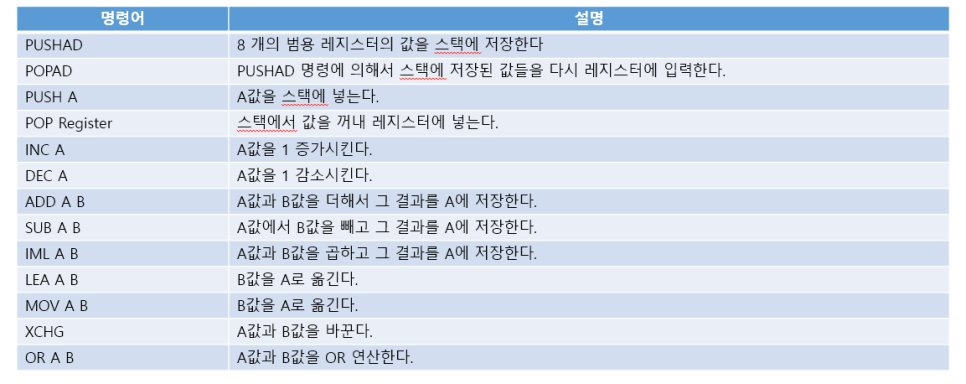
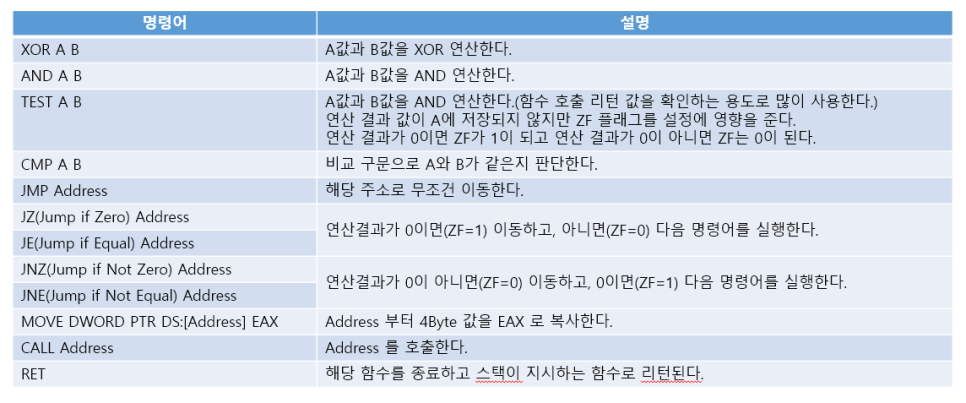
There are these commands. Operand (The opcode indicates which data is to be operated on as the operand, and may or may not exist. Operand (Parameters - Parameter)The operands can be registers, memory addresses, or reference values.
Reviews
The first class of the application understanding and utilization course has started. Since it is an online class, it was mainly a theory class, and theory classes are definitely difficult. In addition, since I had to condense the content to be learned for one semester, I had to study more based on the content and keywords you provided for this blog post, so it took more than three hours... 🤣 I still don’t understand much, so I think I need to work a little harder.