
Ⅰ. Overview
Following the previous post, we will complement the missing parts of the CPU and memory. We will use the PEView program to examine the PE structure. We will use the Ollydbg program to examine and manipulate the flow of the compiled process.
Ⅱ. CPU and Memory
CPUFor a more detailed explanation, please refer to the previous post. CPUs can be divided into dual-core, hexa-core, and so on. Each core has its own individual registers, which is common in modern computers. Multi-TaskingThings have become easier. The point to note here is that multi-processor and dual-core, hexa-core CPUs are different concepts. Since a processor refers to a hardware device such as a CPU, a multi-processor has two or more CPUs, and a core is part of a CPU. In other words, Multi-processorA single CPU can have multiple cores, such as a hexa-core CPU.
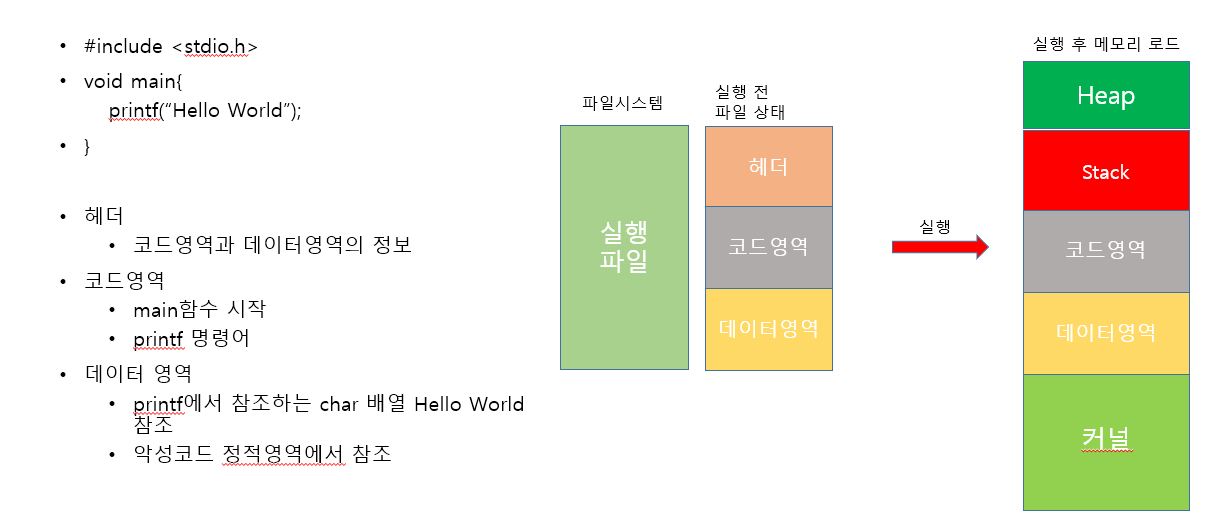
Let's recap the memory structure once again.
It works like this: the kernel sends and receives signals from the hardware, ShellWhen a user's command is received, it acts to operate the device. Therefore, all operating systems send commands to the kernel through the shell to operate various hardware components such as the computer's speakers, monitor, and LAN card.
[SK Shillers SeSAC Sungdong 1st Batch] Virtual Machine, Linux, Ubuntu
I have summarized the content in a little more detail, so it is worth referring to. For security and safety reasons, direct access to hardware is not allowed. This means that access to the driver is through the kernel, and access to the kernel requires the use of a shell. The shell acts as a kind of wrapper, allowing users like us who do not know machine language to issue commands to the kernel and hardware. This shell is Parent-child relationshipYou can have inheritance, which is easy to think of if you've done any web development. There's a main shell, and this shell creates various program shells, which are Main processC child processIt is created and run. In Windows, the main shell is '
'explorer.exe'When we open a browser or run Word, PowerPoint, etc., it runs through the main shell. The newly created shell becomes a child process, and within it, the main thread and child threads each execute the functions of the program. Main threadIt controls the entire process, child threadEach of these performs a specific function.
※ When creating a Windows process management module program, there are useful Python modules. It is also fun to try using the wmi module in Python, so we recommend that you give it a try.
The discussion about the kernel has gotten long, but let’s come back to memory. Memory is broadly divided into the following categories: 'Stack area - Heap area - Data area - Code area' You can think of it as being in order. In fact, the data and code areas don't really care about order, so they're arranged like that in the image above, because the data area Global variables, static variables, and so on are storedThe code area is literally Code related to the execution of the process is storedThe stack and heap areas are important in order. Memory addresses are high addresses below and low addresses aboveThe stack area is located below the heap area. Save from high address to low addressInstead, the heap region is Save from low address to high addressThe stack area is Local variables or parameters are storedand the heap region can be referenced at any time Allocated dynamically and are instancesis stored.
Ⅲ. PE (Portable Executable)
As I mentioned briefly in a previous post, Windows executable programs (processes) are structured as PE files. StructuresIt is good to know that a structure shows the code, data, and other information of a process in byte form, instead of the list or JSON format that we are familiar with. How this structure is displayed depends on each header, whether it is in the form of a zip file, a PE file, MFT, VBR, or any other format. Header structureIt has a header. (It has similar features.) The header is divided into bytes, and it is detailedly classified, such as which bytes perform which functions or roles, and what the actual data is.
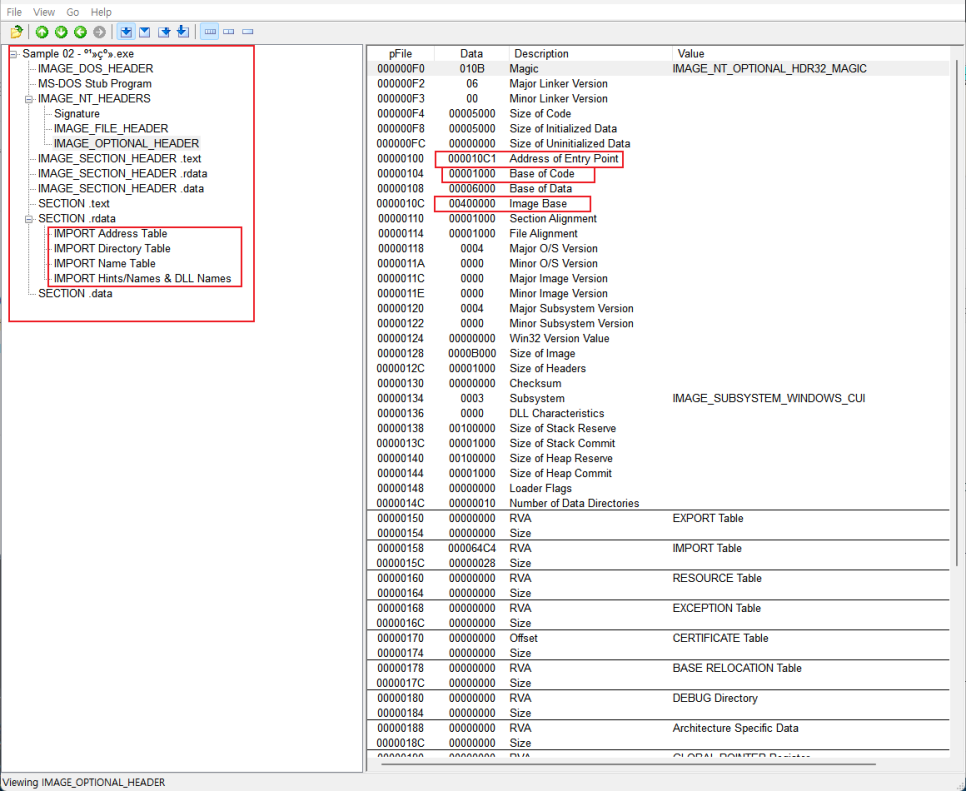
Although this has already been briefly explained, by using a program that shows the PE structure, we can examine the types and classifications of the headers and learn the actual address values. There are fixed header values, but there are also dynamic header values, so it is important to know what each byte contains when analyzing them. In this exercise, we will try to manipulate the flow of the process in a simple way.
Zero Flag manipulation
In this sample program, the actual execution main code starts at address 401000. So, we set a BreakPoint and press the F9 shortcut (which executes the BreakPoint all at once) to move to address 401000. The Zero Flag returns 1 if the comparison operation is equal, and returns 0 if it is not equal.
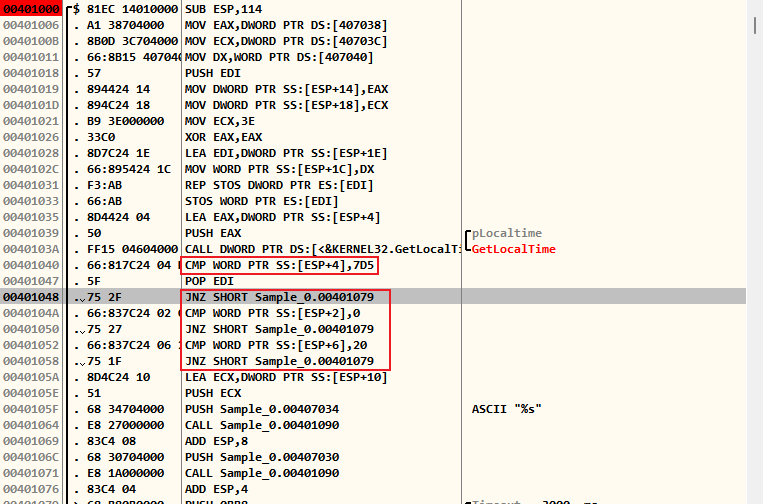
If you look at the red part, the assembler performs JNZ (jump if the comparison result is not equal) through the CMP (compare) instruction. So when you actually run the program with the F7 and F8 shortcut keys,
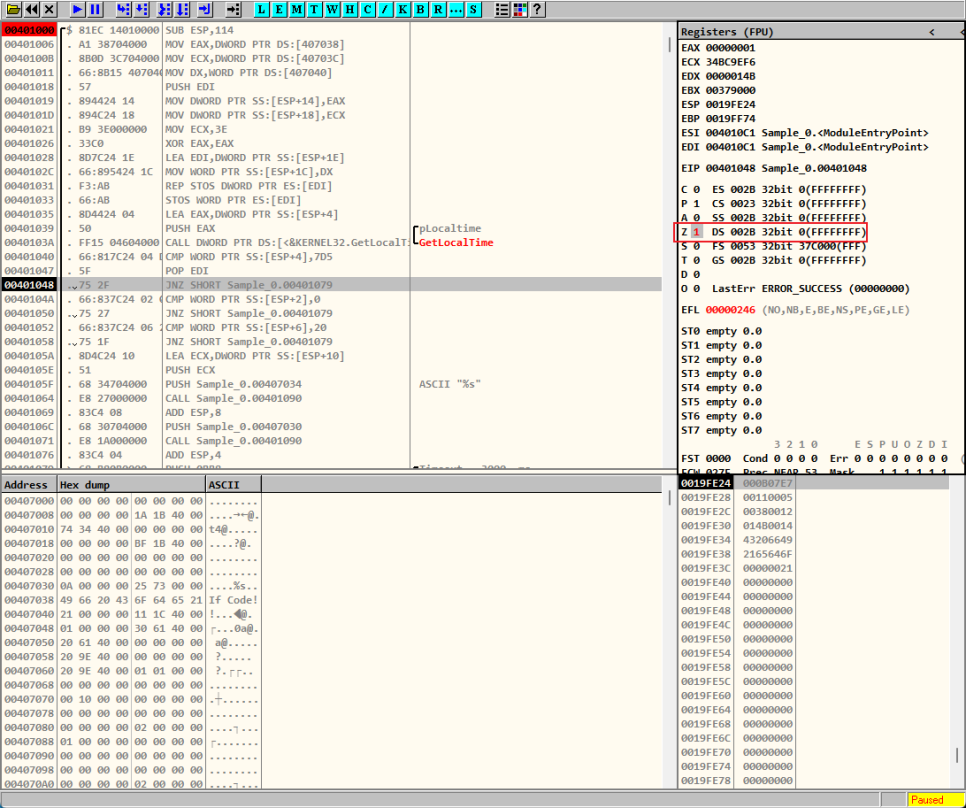
If it is modified to 1, the comparison operation recognizes that the result values are equal, and the code proceeds without skipping.
Change the JNZ command
In that case, couldn't we change the Zero Flag instruction instead of the JNZ instruction to JE or JZ (jump over the next instruction if the comparison operation results in an equality)? Of course we could.
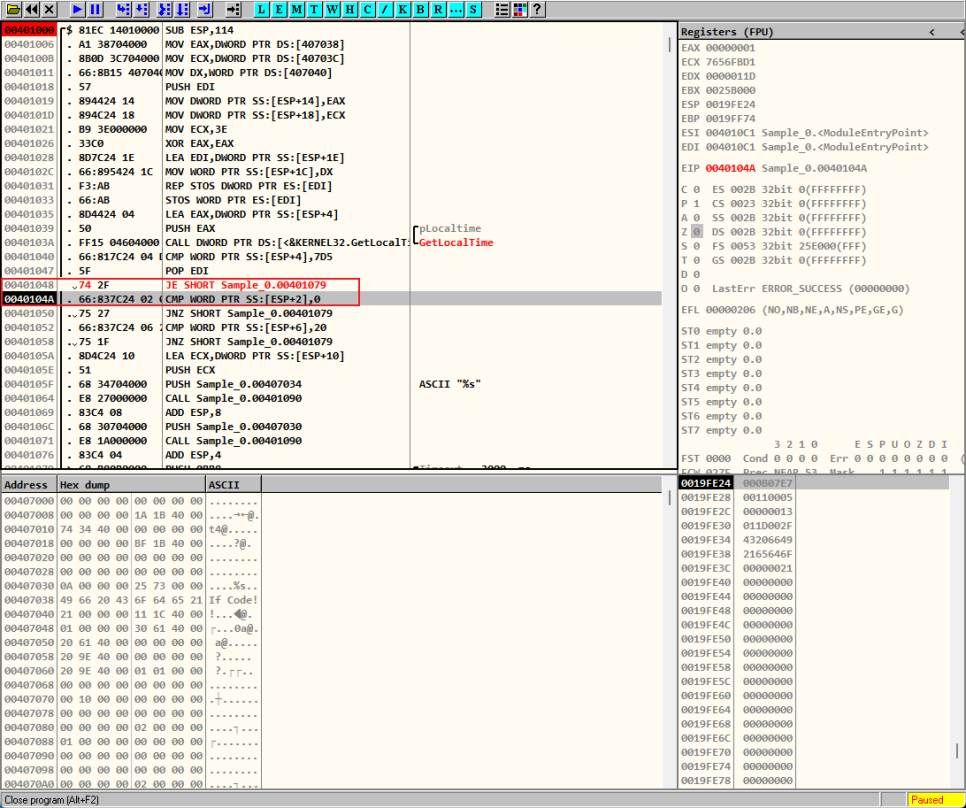
In this way, we can see that the process flow is not skipped and is passing smoothly. There are two ways to change the instruction, as shown in the picture, the JE and JZ instructions are 75 in hexadecimal. We can change this value to 74 or enter the instruction itself as JE and JZ.
Change the process logic address
If you look closely at the images above, you can see that Sample_0 is followed by 00401079. The sample at the front is the program name, and the address at the back is the code address, which indicates which code is executed when the JNZ instruction is executed. If we change this code address to 401000, which is the very first one, what will happen?
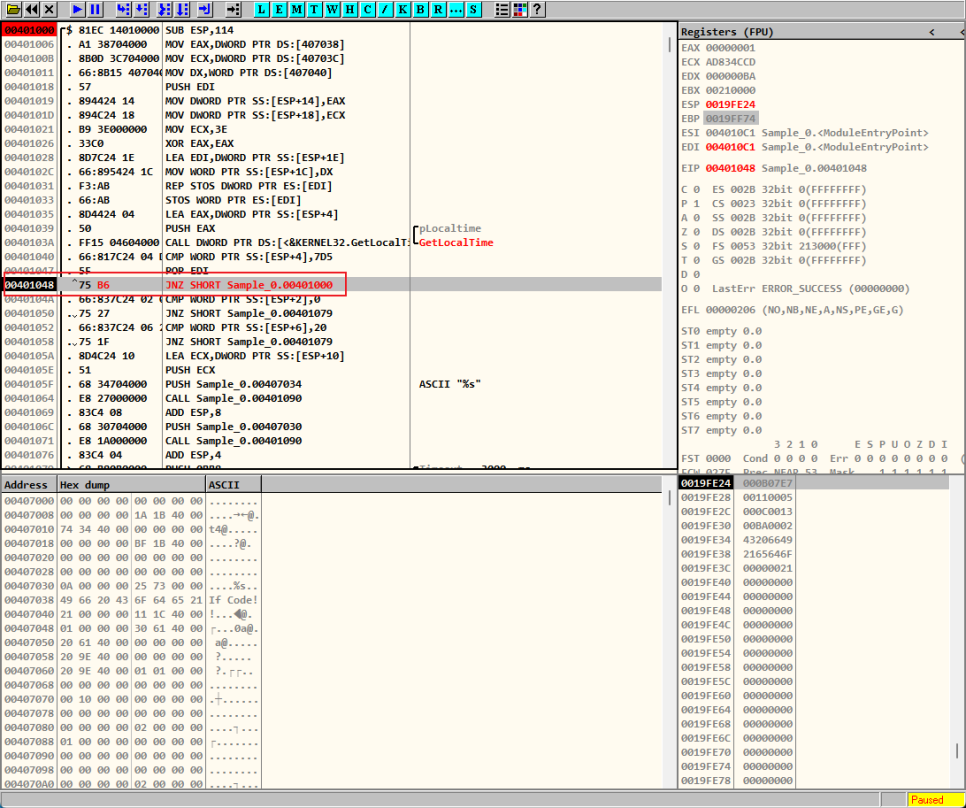
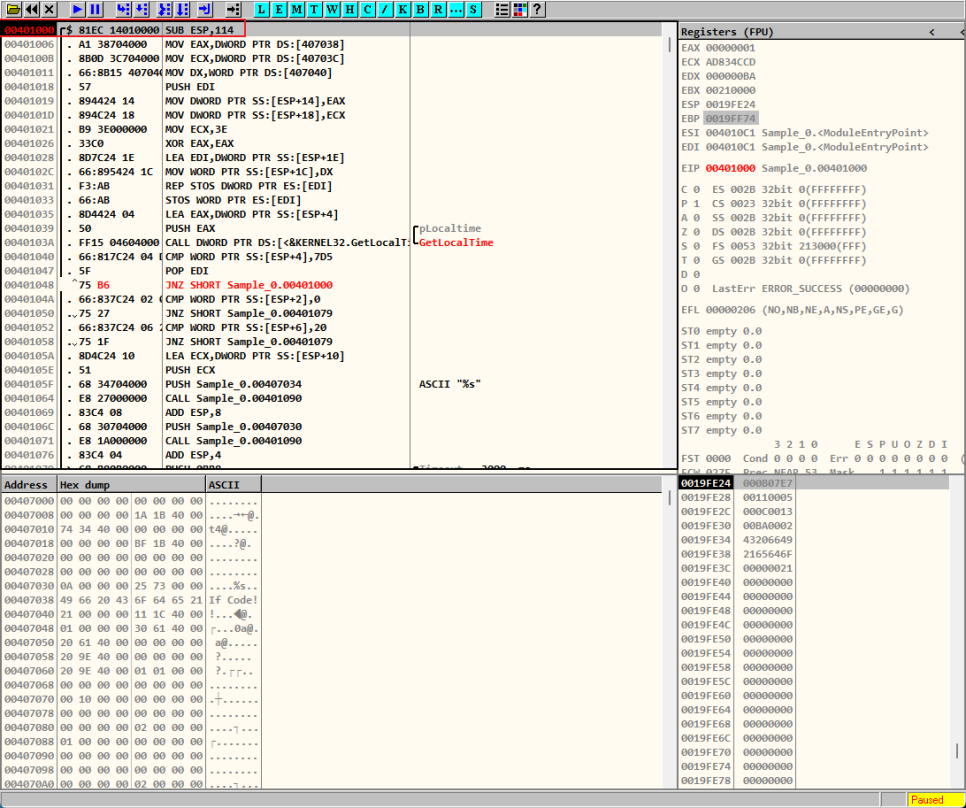
As shown in the above image, 401000 to 401048 will be repeated indefinitely.
※ Addresses such as 401000 and 401048 are technically OffsetIt gives a relative address from a specific address in memory. Since we will make extensive use of this Offset, it is good to know about it.
Change comparison data through HxD
This involves actually changing the values of the comparison operations written by the developer through HxD.
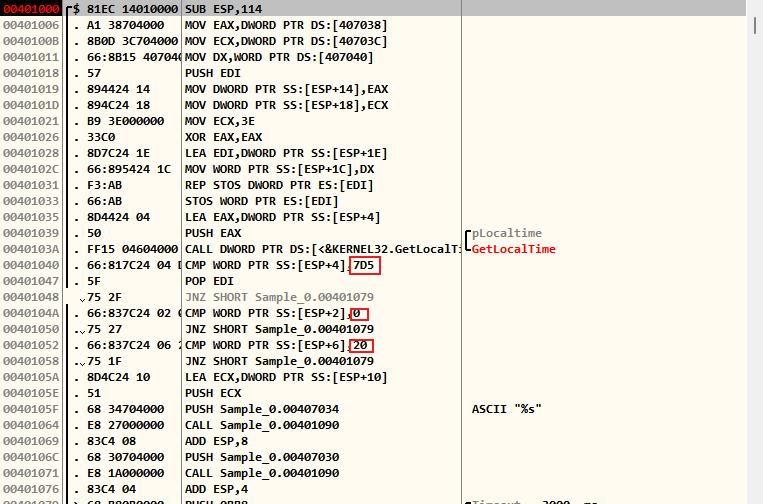
The red part is the actual comparison values, and you can see that GetLocalTime is getting the current time. From the PE structure, we know that the starting point of the Base Code is 1000. And from the image above, we know that the hexadecimal 7D5, along with the instruction, is at address 401040. The 400000 in front is the starting point of the process's memory, and since the actual code is based on the Base Code, starting at 1000, if you go to address 1040 through HxD,
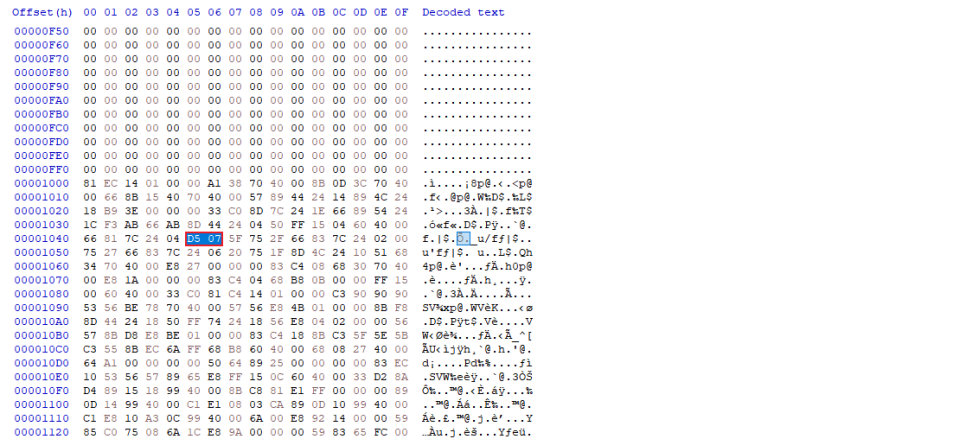
You can see that. Now, we just need to convert this value to the current year, find the remaining 0 and 20, and convert them to the current month and date.
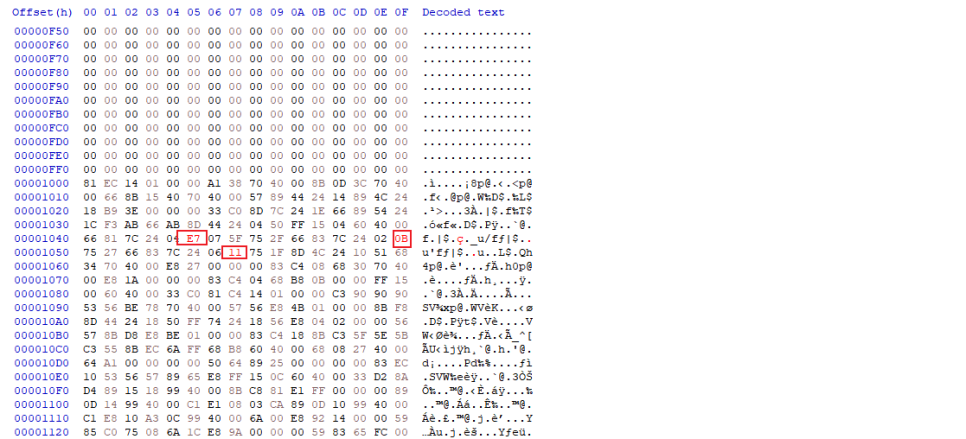
After that, run OllyDbg again and see what happens.
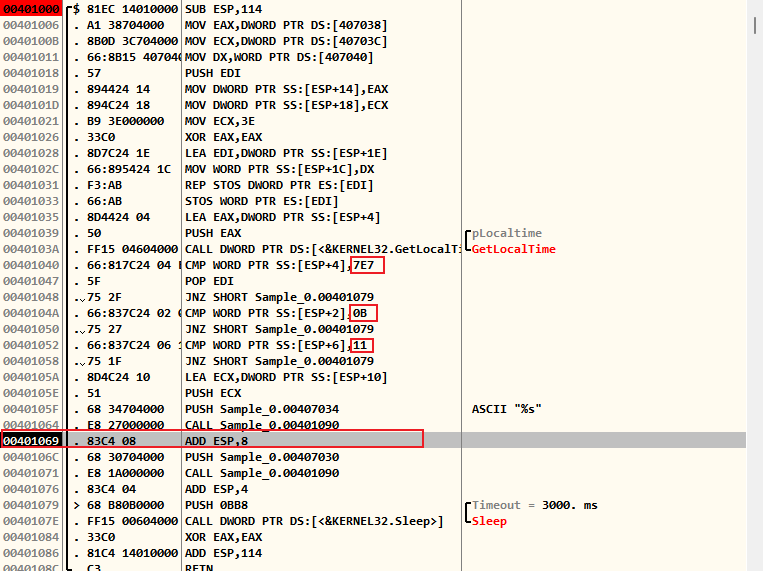
You can see that the values have been changed and that the CMP comparison operation has passed successfully.
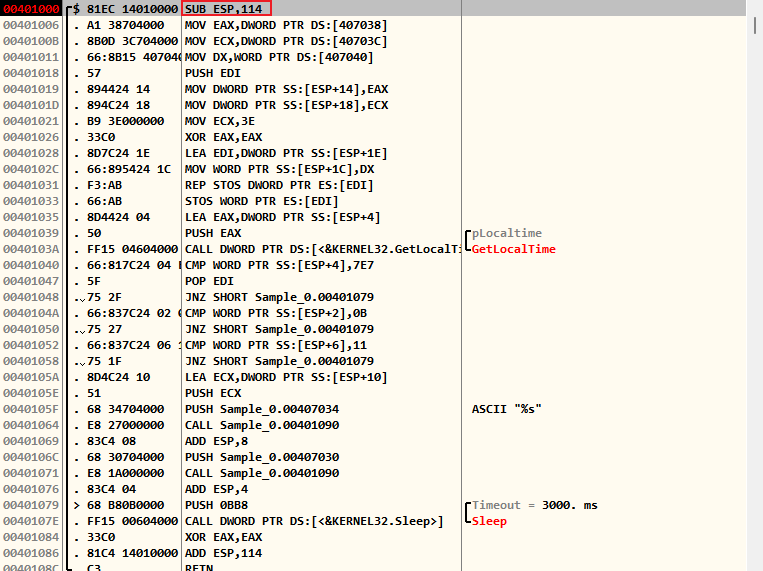
※ The process operates by allocating memory and referencing address values to use variables, call functions, or access data. The stack region starts at a high address and builds up in a LIFO (Last in First out) structure, so when you look at the starting address of the code, SUB With commands ESPThe ESP subtracts 114 from the bottom of the stack area (the last address, which may be confusing, but the top is the bottom). This can be very confusing, but Since it proceeds from top to bottom, and since it goes from a high address to a low address, it subtracts the amount of memory (114) required for the function to operate.
Reviews
Understanding and utilizing the newly started application was even more difficult than last week’s challenging network. 🤑 Forensic and reversing felt like something I couldn’t easily approach without minimal experience, and as a non-major, it was a significant barrier to learning, but I think I managed to get through this week well. 🤣 Of course, if you ask me if I understood, that’s another story. 😅 I’m going to post a few more articles and try to review and summarize what I’ve learned.