
Ⅰ. Overview
API Hooking API Let's take a quick look at Hooking. Windows API Let's take a look at what it is and what it contains. API I will introduce a platform related to hooking, a process monitoring program provided by Windows, and function information. API With sample code that can be hooked up, Windows in Python API Let's take a quick look at how it works. Let's analyze the packet structure. When we create a packet file, we basically have a Global Header, followed by a Packet Header and Data. We'll analyze the structure of the data link, network, and transport layer protocols to show how to extract only the information we need.
Ⅱ. API Hooking
API Hooking API Hucking)Silver The Flower of ReversingIt's called tampering. It involves intercepting information, changing the execution flow, or providing functionality that is different from the original. The reason this is possible is that Penetrating the processThis is because Windows uses various functions and features within the system through its API. For example, it can turn on Bluetooth, access the file system, or change the date. Windows APIA kernel is a set of functions that allow these functions to be used. To access the hardware, the kernel connects to the interfaces of each device, and each shell is a set of processes running in a window. This is why certain user programs (such as MPlayer, a browser, etc.) can run smoothly in a window, because they can use these window processes. The Windows API is connected to these window processesbecause they want to help.
※ To be more specific, in Windows, the main parent process, explorer, uses the CreateProcessA function to create a program that the user is using. Create processes. Once the process is created, the main thread starts running, and the main thread calls each child thread.
CreateProcessA function (processthreadsapi.h) - Win32 apps
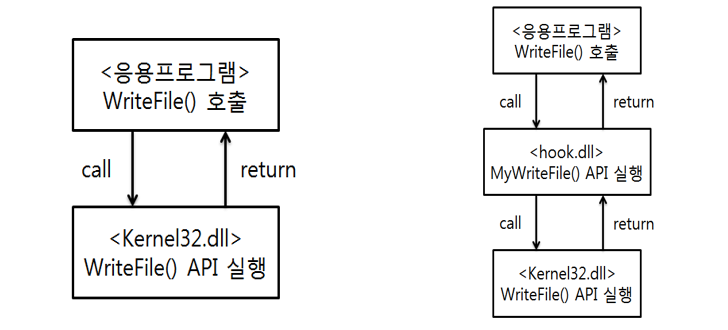
API hooking occurs when a specific process executes that process through an API call. Intercept in the middle and take controlI manipulate the parameters or return values that are passed to the API, canceling the call itself or changing it to the process flow I want.
One of the most famous platforms that enable API hacking is Frida.
This Frida is available on almost all operating systems and runs in the JavaScript language. For more information on usage and functions, please refer to the above website.
As a useful tip, JavaScript led to the rapid development of the web, as the V8 engine was developed, making the JavaScript language available on any web.
※ We introduce a program provided by Microsoft that tracks processes. It tracks all processes in Windows, but it cannot prevent or detect infiltration into multiple shells through API hooking. In particular, Malware that changes the file name to show the process name as normal and then runsThere are quite a lot of them. It’s not that they’re not helpful, but there are aspects that can be learned by looking at additional information such as the actual path and creation date of the process. I’ll post more details in a later study.
I attach a simple example code.
var hook_createprocess = Module.getExportByName("kernel32.dll", "CreateProcessW");
Interceptor.attach(hook_createprocess, {
    onEnter(args) {
        var lpApplicationName = args[0];
        console.log(Memory.readByteArray(lpApplicationName, 4096));
        var applicationName = Memory.readUtf16String(lpApplicationName);
        console.log(applicationName);
        var lpCommandLine = args[1];
        console.log(Memory.readUtf16String(lpCommandLine));
    },
    onLeave(result) {
        //console.log(result);
    }
});
This code infiltrates the function that creates the processes, allowing us to see in real time which processes are being created.
Additionally, let's take a closer look at how the Windows API is used through the Python file writing function.
fd = open('경로\\aaaa.txt', 'w')
fd.writelines("12345abcde")
fd.close()
The reason why this code can generate a txt file is because of Windows. CreateFileA Functions and WriteFile This is because functions can be called through the Windows API. Each function corresponds to a file system operation. Accessing MFTThe MFT stores any (empty, safe) space on the partition. Specify the sectorand is placed in that sector. Save dataThe MFT contains information such as the file's time, name, and location. Various information is recorded (stored)It returns a set of functions that manipulate this sequence. It is also sometimes referred to as a handle, where a handle is simply an interface for manipulating these functions. The reason for returning them is obvious: they cannot continue to occupy memory.
Ⅲ. Packets
So far, we have learned about the structures of PE, ZIP, and DISK (FAT, NTFS), and how to use HxD to understand the structure or change the values. Now, let's take a closer look at the packet structure of a network.
※ As a useful tip, even though IPv6 has been developed, IPv4 is still used. The reason is NATThis is because it can be separated into public IP and private IP, and it is also good for security through port forwarding.
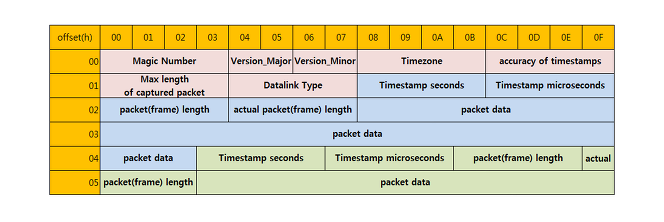
To take a closer look at the packet structure, you can refer to the blog above for more details. The first 24 bytes are Global HeaderThere is a header that is attached to the pcap file by default. Next, Packet HeaderThe packet arrives, and there is a packet header. Packet DataThe process is repeated in pairs. If the Global Header has been separated, the Packet Header and Data should be distinguished, and the Packet Header consists of 16 bytes, with the length of the following Data being indicated as 12 to 15 bytes. In other words, the sum of the length of the Header (16 bytes) and the length of the Data represents the next packet. Of course, initially, the values in the Global Header should be added together.
Now, let's actually retrieve the packet data from the data link, network, and transport layers.
For information on the data link layer, network layer, transport layer protocols, and header and data structures, see the above post. The first information you will find in Packet Data is Ethernet It is information. It is at the data link layer, and MAC AddressThe first 3 bytes of the MAC address represent the manufacturer, and the last 3 bytes are a unique identifier (serial number) assigned by the manufacturer. By default, the MAC address is 6 bytes long, and it is included in the packet data. Destination AddressYou come first. Source AddressIf the Source Address comes first, then the Destination Address must be jumped over by 6 bytes in order to find it. This is an unnecessary extra step.
[Network] Ethernet/TCP/IP Header structure
In previous posts or on this blog, the Ethernet header structure is explained in detail. However, since the dumped packet file does not contain all the header structures, it is only necessary to obtain the destination address, source address, and type. In other words, it is only necessary to obtain 6 bytes, 6 bytes, and 2 bytes.
※ The MAC address is mapped to the IP addressWhen it finds the MAC address for an IP address, it broadcasts it. If the responding device is on the same network and has the same IP address, it sends its MAC address as a separate response. It reports immediately without the need for authentication values. This is the role of the ARP protocol, which looks up the MAC address through the IP address. ARPon the other hand, if you find the IP address through the MAC address RARPHe says.
※ Related to the ARP I just mentioned ARP SpoofingThere is an attack called MAC spoofing, which exploits the fact that a device reveals its MAC address immediately without any additional authentication, by intercepting packets transmitted during network communication. SniffingThis allows the attacker to manipulate data in the middle by using the ARP request to reveal the user's MAC address and also to inform the server of their own MAC address. This can be done in places such as cafes where multiple devices share the same network bandwidth through a router. How to defendInstead of checking for anomalies in the MAC addresses in the same network range (whether there are duplicate MAC addresses, for example, using the arp command), it allows you to dynamically map IP addresses to MAC addresses and change them. You can statically map it so that it cannot be changed.
Useful information that can be extracted from the dumped packet file regarding the IP protocol at the network layer includes: Time to Live, Protocol, IP Address There are others.
For more detailed information, you may want to check out the blog mentioned above. In fact, if you calculate only the IP protocol-related part of the packet file using WireShark, the Time to Live value will be displayed before the Version, Services, Total Length, Identification, Flags, Frag OffsetThere is information. If you want to look at it, you can just look at how many bytes each one is without putting it into a separate calculation. Since we want to know the Time to Live value, if we calculate the previous information byte, we can see that it comes after 8 bytes. And The protocol starts with the next 9 bytes, with the Source Address of the IP address ranging from 12 to 15 bytes, and the Destination Address ranging from 16 to 19 bytes.
※ Since the IP protocol section comes right after the Ethernet protocol, it is necessary to add 14 bytes (the length of the Ethernet protocol information) to start the calculation for accuracy.
※ IP address Source AddressAnd Destination AddressYou can tell whether an IP address is a private IP or a public IP by looking at it. Since we typically use C-class private subnets, if the IP address starts with 192.168., it is a private IP, and otherwise it is a public IP.
The transport layer is TCPAnd UDPIt is divided into TCP and UDP. So when calculating, we need to determine whether it is TCP or UDP. While extracting the IP protocol from the network layer, we can see that the above Protocol You may have encountered this information before. When you convert a hexadecimal value to decimal, you get 17 and 6, which is the value that indicates whether it is TCP or UDP. TCP is 6, UDP is 17Therefore, we can analyze the structure by dividing it into these values.
Let's look at TCP first. The information you need to know here is Source/Destination Port and Sequence/Acknowledgment Number, Flags, Payload (pure data)After obtaining the IP protocol data (total 20 bytes), Each 2 bytes of Source/Destination PortYou can know that, and then Each 4-byte Sequence/Acknowledgment NumberFlags require a bit of computation. Only the last 1 byte of the next 2 bytes after the Acknowledgment Number is extracted. & You can find out by doing the calculation. 0b00100000 & When calculated, the Urgent Flag value is 1, indicating that a request was made. 0b00010000 is the Acknowledgment value, 0b00001000 is the Push value, 0b00000100 is the Reset value, 0b00000010 is the Syn value, and 0b00000001 is the Fin value.Once we have obtained the values of the 6 Flags, we can finally obtain the Payload. It starts after the 20 bytes of the TCP Header, but it may be empty, so filtering is necessary. If it is not empty, Until the Header and Data of the next packet (i.e., until the next packet arrives) Just extract it.
※ Provides TCP status information FlagsThe values provide us with useful information during the 3-Way-Handshake process. Urgentis Urgent Requestmeans Ackis Completemeans Pushis Immediately forward received data to the application layermeans. ResetSilver Ignores the remaining data requested after forcibly disconnecting. SonSilver Connection requestmeans, and finally FinThis indicates a normal connection termination. If you monitor and block packets for this SYN request, you can enhance security.
If we look at the connection process using Syn and Ack, and the Seq number, the client initially connects to a specific server. Random Seq number when making a sync requestsends it. The server receives The value added to the Seq number by 1, and the Ack numbersends it back. The client Send the value obtained by adding 1 to the received Ack number as the Seq number, and a new random Ack numberis ultimately connected by sending a Syn and an Ack. Once you understand the concepts of Syn and Ack, you can target the attacker. Port scanningThis allows us to not log to the TCP log before attacking. Check whether the server is openIt is a synchronous operation. When you make a Syn request and receive an Ack response, you immediately close the connection. How to not send the final connection completion Ack requestThis process is, strictly speaking, TCP Half-Open Scan (Stealth Scan)Another important reason for these TCP information is that these stealth scans can be prevented in advance by using a firewall to block requests for ports or flags.
※ The payload data of TCP is Web communication packets (the body portion of the Get and Post methods in HTTP), i.e., the actual transmitted dataIt contains data.
Moving on to UDP, in UDP, Source/Destination Port and UDP PayloadYou only need to extract it. It is definitely simpler than TCP. Similarly, you can start calculating from the IP protocol in the network layer. Source/Destination Port is 2 bytes eachYou just need to calculate the length. Then, it will tell you the total length, including the UDP header and data (payload). LengthWhen sending UDP payload, you need to subtract 8 from this length value. This is because two port numbers, length, and checksum information are all 2 bytes before the UDP payload. Total 8 bytesThat is, the Source/Destination Port is 2 bytes each from the beginning. UDP Payload is where 8 bytes are subtracted from the value of LengthIf you extract up to this point, you will be able to retrieve the desired information.
※ The port used to send queries over UDP is 53. Usually, UDP is used to send an IP address to the Domain Name Server (DNS) to find out where to go. There are two types of UDP: forward and reverse. www.google.com and Forward lookup involves finding the corresponding IP address given the host name, while reverse lookup involves finding the host name given only the IP address (e.g., 192.168.0.10).
Reviews
While wrapping up the class on Friday, I was coding to analyze packet files in Python. It seems that understanding how to extract structures becomes a bit easier as I keep looking at how to calculate it while coding in Python. I think I will have to understand the various data structures I learned this week, and probably mobile devices will be included next week.