The volume is getting bigger... I'm writing the second post on the ICMP protocol at the network layer. Check out the next post!
Ⅰ. Overview
NetworkIt is a concept that encompasses the entire communication process, ranging from the physical aspects to those that are not, and the type of network varies depending on the scale. LAN (Local Area Network)It is typically a collection of PC main frames and workstations connected by communication lines of less than 300 meters. MAN (Metropolitan Area Network)It provides high data transfer rates at the LAN level, by linking LANs together as a high-speed backbone. WAN (Wide Area Network)It can be configured over a geographically distributed network, covering a larger area than a LAN. Depending on the data transmission method, there are two types of networks: circuit-switched and packet-switched. Let's look at packet-switched networks. ProtocolIn the case of OSI (Open System Interconnection) 7 layersAlthough various protocols can be configured, it is important to understand the basic concepts, functions, and types of protocols, and to learn more about the data link layer, network layer, and transport layer protocols. The protocols for the remaining three layers, the presentation layer, and the application layer, will be covered in later sessions.
Ⅱ. Networks and Types
NetworkWhat is a network? It is a combination of the words "net" meaning "net" and "work" meaning "work". It means that it is closely and long connected like a net. Although it is a term commonly used in the IT industry, it is so widespread that there is hardly anyone who does not know about it. Simply put, a network is a communication network that connects two or more computers or smartphones. Network types are divided according to their size or data transmission method. When divided according to size, LAN (Local Area Network), MAN (Metropolitan Area Network), WAN (Wide Area Network)It can be classified as
LAN (Local Area Network)
LAN is generally easy to understand when you think of using the Internet at home. It is typically connected by a communication line of less than 300M, which means that the range of electric current or radio signals that can be transmitted accurately is limited to the inside of the house, but not the outside. As a high-speed communication network, Ethernet, a computer connection method, was first put into practice in the early 1980s at a research facility of Xerox.
MAN (Metropolitan Area Network)
LAN at high speed BackboneIt provides high data rates at the LAN level, where the backbone is simply a collection of small networks connected to each other through a large pipeline of high bandwidth to other network sets. Typically, the range is considered to be connecting cities or large campuses.
WAN (Wide Area Network)
It is a network that can connect geographically dispersed communication networks over long distances, such as between regions, countries, and continents. This is the type of network that allows us to access services like Google and Netflix.
The network transmission method is Circuit Switched NetworkAnd Packet Switched NetworkThere is, but since we are actually using a packet switching network, it is enough to understand the concept. A packet switching network is a network that transmits the information that it wants to send. PacketThe person making the request divides the request into small units and inserts the sender and receiver addresses into the packet, which is then sent to the packet switching network. Packet SwitchThe router looks at the address written in the packet and forwards it to the final destination, which can be transmitted through multiple paths depending on the network conditions. The communication path is not determined in advance.
※ Here, the source and destination addresses refer to IP addresses, and we will discuss this later, but IP addresses are transmitted along with MAC addresses.
Ⅲ. OSI (Open System Interconnection) 7 Layers
This is an invalid image.The figure shows OSI (Open System Interconnection) 7-layer structureThe OSI 7-layer model represents the seven stages through which network communication takes place. The first stage is Physical LayerThis transmission occurs through physical equipment (hardware). The second step is Data Link LayerIt manages the data transmitted and received at the physical layer to ensure the delivery of information. The third step is Network LayerThis fourth step involves the ability to transmit data securely and quickly to its destination (routing). Transport LayerThe nodes play a role in ensuring that users between the two points can reliably exchange data. The fifth step is Session LayerIt is similar to the fourth stage, the transport layer, but allows for more advanced logical connections. The sixth stage is Presentation LayerData is encoded, encrypted, and otherwise represented in a standard manner. Finally, the seventh step is Application LayerWhile it is good to understand this concept in detail, in this 'Cloud-based Mobility Convergence Security Process', we focus on security-related issues arising in the 'Data Link Layer', 'Network Layer', and 'Transport Layer', and we will look at these layers and learn about the related protocols.
Data link layer
The data link layer detects and corrects device signals received from the physical layer. The hardware of the physical layer typically detects electrical signals sent by LAN cards, using the following protocols: Ethernetby MAC (Media Access Control)It communicates based on addresses and acts as a network gateway, transferring data to the third layer.
Network layer
The process of connecting the source and destination nodes to exchange actual data and performing the navigation function is called routing, and it takes place at the network layer. The most important protocol in this layer is IP (Internet Protocol)And ICMP (Internet Control Message Protocol)The router uses this protocol to route user messages, and it is associated with ARP (Address Resolution Protocol), RARP (Reverse Address Resolution Protocol)It exists.
Transport layer
This layer is responsible for direct connections between two entities that exchange actual information. The most important protocols in this layer are TCP (Transmission Control Protocol)And UDP (User Datagram Protocol)Each protocol has its advantages and disadvantages. Ultimately, the data link layer handles the connection to physical equipment, the network layer provides routing between hosts based on signals from the physical equipment, and the transport layer handles actual communication between processes.
※ What is inter-process communication? For example, it handles the data exchange between applications (browsers) on two computers. From the perspective of a developer, it can be seen as handling communication between the server and the browser.
IV. Protocols (data link, network layer-oriented)
Before we go into the protocol types and descriptions for each layer, let's first explain the protocols: ProtocolA protocol is a mutual agreement on how to conduct diplomatic relations between countries. From a computer perspective, it is like defining how messages are structured and how they are transmitted in order to communicate with each other. Syntax, Meaning (Semantics), TimingIt has three elements: syntax defines the data format or signal, encoding method, and semantics defines various control procedures such as error detection, synchronization, and flow control. Sequence defines the communication rate and order between the sender and receiver or between the end-to-end system and the network.
The protocols defined in this way perform various functions. For more information, see the following materials:
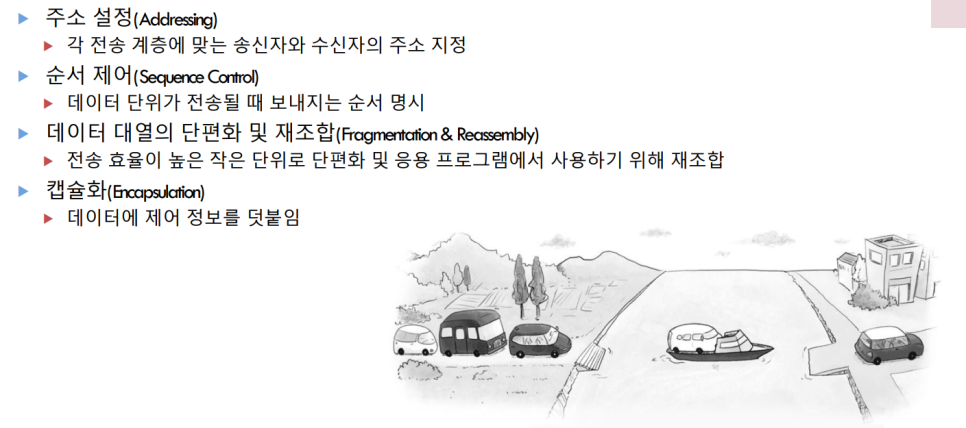
Refer to the Linux and Networking lecture syllabus
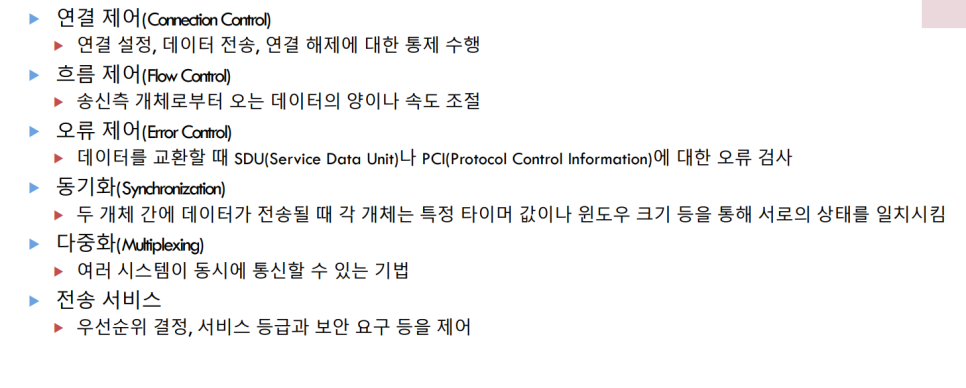
Refer to the Linux and Networking lecture syllabus
This can be summarized as follows. We recommend that you read it briefly, and the related functions will be covered later when we discuss the protocol, so we will skip over them.
Data link layer protocols
The most common protocols in the data link layer are EthernetThe Ethernet protocol allows communication between network hardware (network adapters) based on MAC addresses. The minimum length of an Ethernet packet is 64KBytes, and the maximum length is 1,518KBytes. The packet structure can be configured as shown in the following image.
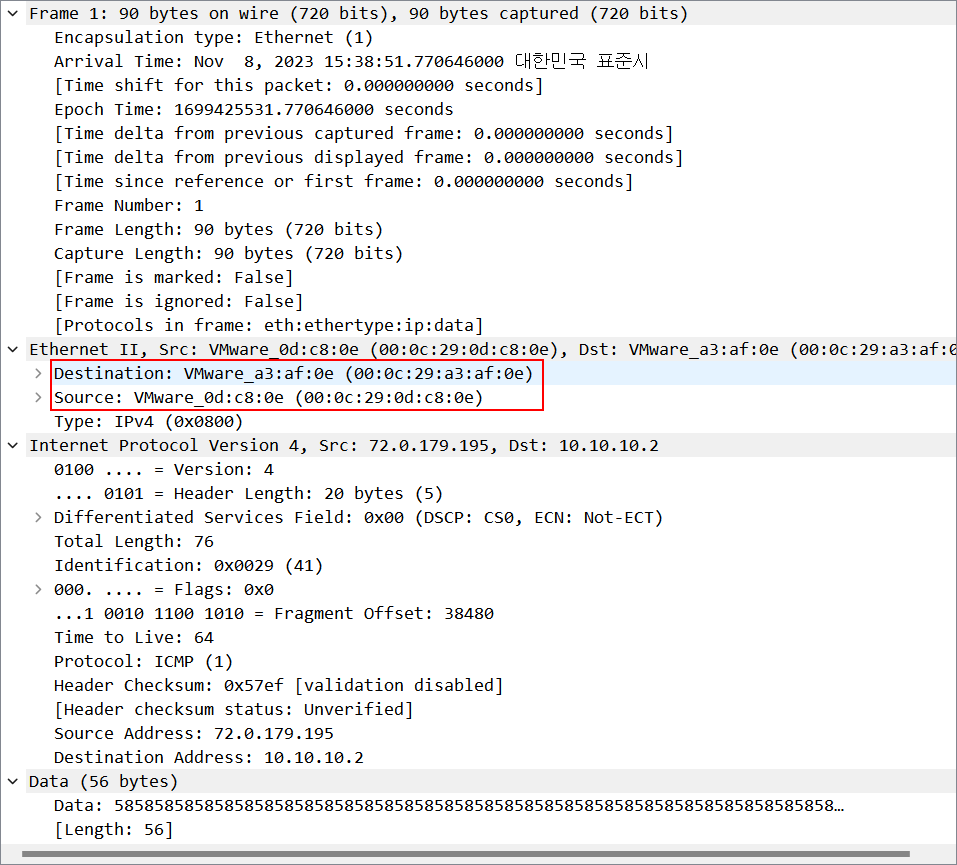
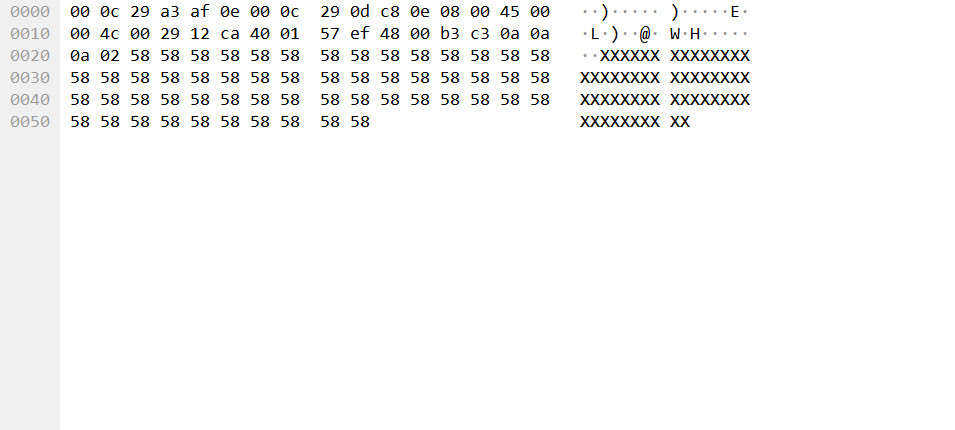
Since these topics are so extensive, the first thing you need to know is Destination MAC AddressAnd Source MAC AddressThe destination MAC address is the MAC address for the network interface receiving the packet. The MAC address is considered to be a unique identifier for the LAN card. In the first image above, the MAC address is shown in parentheses. :'The MAC address is distinct, and while it used to be fixed by hardware manufacturers during manufacturing and could not be changed, it can now be changed through drivers.
※ The MAC address is mapped to the IP address The IP address is unique to the server providing the service, and will be discussed later. Therefore, to prevent hacking attacks that change the IP address, it is important to identify the server not only by its IP address, but also by other means. Store both the MAC address and the IP addressEven if an attacker tried to access the site by changing the IP address, they could be blocked by the MAC address. However, as the MAC address became changeable, attackers would continuously send requests to the server, replacing their MAC address with the server's IP address.
※ To explain packets in simple terms, it is rare these days, but in the situation of sending a letter to a grandmother or grandfather in the countryside LetterIt defines how a packet becomes a message and how that message can be delivered through the post office. ProtocolIt's about leveraging it.
If the destination MAC address is all 1s (FF:FF:FF:FF:FF:FF:FF), we will discuss this later. Broadcast packetsThe source MAC address refers to the MAC address of the network interface that is sending the packet, which is the MAC address of the LAN card on my computer.
Network layer protocols
The protocols at the network layer are typically IP (Internet Protocol)And ICMP (Internet Control Message Protocol)Before entering the IP and ICMP protocols, it is important to understand the MAC address associated with the previous data link layer protocols. ARP (Address Resolution Protocol)ARP is used to discover the MAC address of a network interface in order to reach the destination system. How do we know the MAC address of the other party, which is the unique identifier of the LAN card? This is the answer to the question, and it is also the reason why packets can have a destination MAC address in the Ethernet protocol. ARP Protocols that map IP addresses to MAC addressesAs such, it maps not only the IP address and MAC address of my computer, but also the IP address and MAC address of the recipient (server) to whom the message is to be sent. ARP RequestSends a query to find the destination MAC address based on the IP address. ARP Reply When the destination MAC address is received through the process, it is stored in the MAC address table, allowing data to be transmitted by referring to the address table when the same destination is requested later. When an ARP request is made, the responding host is prompted through the broadcast that will be discussed later.
arp -a※ This command displays both the IP address and the MAC address on Linux-Ubuntu.
An IP address is used to add additional content to packets written in the Ethernet protocol, and the first thing to understand is that Source Address, Destination Address, TOS (Type Of Service), TTL (Time To Live), Protocol There are three fields. Source and Destination Address are the sending and receiving IP addresses, respectively, and TOS defines the priority with which the router processes the packet. Minimum delay, maximum throughput (MTU), maximum reliability, minimum costYou can set the minimum delay, which literally minimizes transmission delay, the maximum transmission unit, which refers to the size of data that can be sent, maximum reliability, which is designed to minimize errors and enhance communication reliability, and minimum cost, which means that various routing paths can be taken at minimal cost. These are all related to QOS (Quality of Service) services, which means that paying more money guarantees a higher priority, and the TOS field is what enables this priority to be realized.
TTL decreases by one for each router passed in the routing process, and drops the packet when it reaches zero. This is related to the ICMP protocol that will be discussed later. In IP, the protocol refers to the upper-layer protocols of ICMP, IGMP, TCP, and UDP, and is also related to the transport layer that will be discussed later.
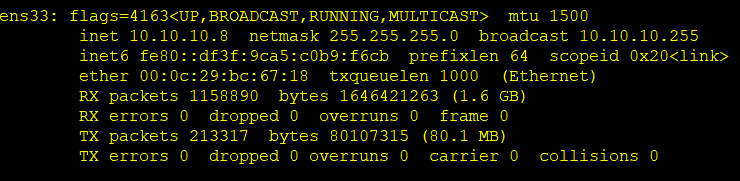
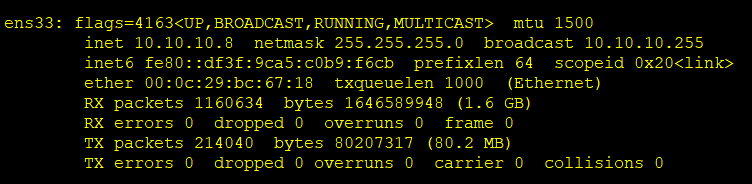
※ On Linux-Ubuntu ifconfig (ipconfig for Windows)If you enter this command, you can find the Ethernet address (MAC address) and the IP address. In the above image, inet is the IP address and the ether part is the MAC address. The part I would like to explain further is RX, TX RX packets is the number of packets successfully received, and TX packets is the number of packets successfully sent. errors, dropped, and overruns refer to the error rate, the number of dropped packets, and the number of overrun packets, respectively. dropped may increase if you are under a DDoS attack.
If we provide further explanation of the ifconfig command up/downYou can start and stop the network,
ifconfig hw ether 바꿀값You can change the MAC address. You can also change the IP address with ifconfig, but it will be reset when you reboot. ip You can view information using commands such as ifconfig(ip addr), and you can also change the MAC and IP addresses.
Let's take a closer look at the address system of the IP protocol.
Refer to the Linux and Networking lecture syllabus
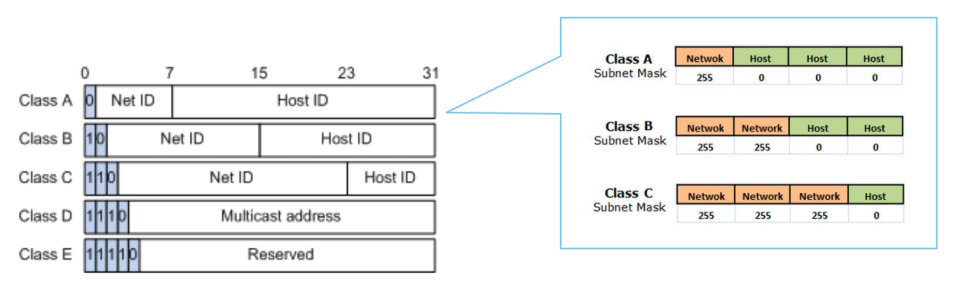
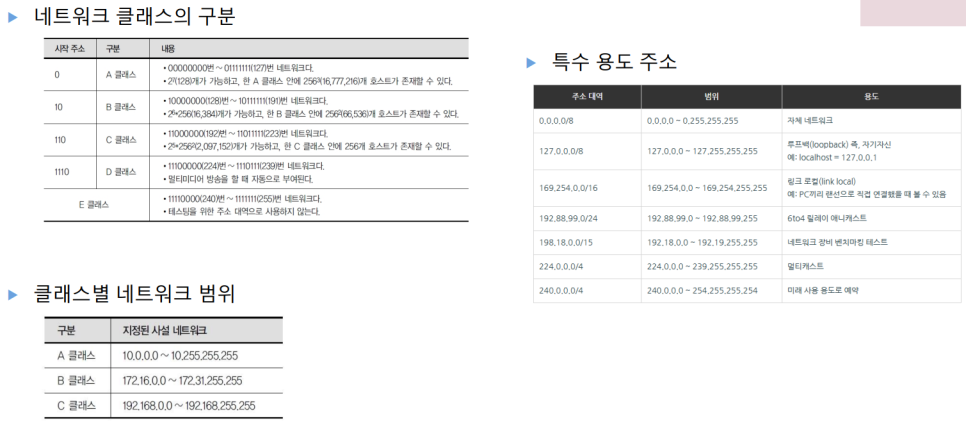
greatly this Five classesIP addresses are divided into groups. While we may be familiar with them because we see them often, theoretically, they are divided into 8-digit groups by placing a period after each 32-bit binary number. This is the familiar format we see when configuring a router. '192.168.0.1'As you can see in the above image, each class is divided into network ranges based on the number of binary digits from the front. Classes D and E are unusable classes, and private networks are usually implemented as classes A, B, and C. The number of networks that can be assigned to each class varies, with class A being the largest and class C being the smallest. The commonly seen '192.168.0.1' is also a class C, and the front field can range from 192 to 223.
Refer to the Linux and Networking lecture syllabus
According to this concept, devices connected to the router have the same network fields by class, with only the host part differing. In the case of class C, the first three fields are network addresses, so whether it is a premise or an educational institution, all devices connected to the router at that location have the same network address, and they can share the results of their work by uploading them to the network address they are assigned. However, there is a value that cannot be used in the last field, the host address. The first number (0) and the last number (255)This is because 0 identifies the network range, and 255 is the network address for broadcast. Broadcasts will be discussed later, but in simple terms, it is a one-to-many relationship where packets are sent to everyone in the same network range.
※ Additionally Subnet MaskThere is a netmask shown in the image below. This is the subnet mask. The subnet mask helps to further divide the network range allocated to each class, allowing for more precise identification of IP addresses. In the case of class C, when the last field, the host ID 2-bit, is divided into the network ID, '255.255.255.0'For example, subnet 1 is 192.168.1.1 to 192.168.1.254, and subnet 2 is 192.168.2.1 to 192.168.2.254.
The reason for using subnet masks to divide addresses in this way is IPv4 (Internet Protocol version 4)And IPv6 (Internet Protocol version 6)It is easy to understand if you know that the existing addressing scheme we have described so far is IPv4.
※ In fact, there was also IPv5. Although it has disappeared now, it's interesting to find out why.
The original IPv4 can have about 4.3 billion IP addresses, and at first, we didn’t know that it would be insufficient. However, as the network has developed, the number of devices commonly used in daily life, such as smartphones, tablets, laptops, PCs, and smart watches, as well as various health-related equipment and machinery, has increased, leading to a shortage of IP addresses. To address this, IPv6 was introduced. The two versions are independent address systems, with IPv6 expressed in 128 bits. Both address systems are still in use.
※ There are additional protocols related to the IP protocol that you might want to know about. DNS (Domain Name Service)There is. DNS Application layer protocolsHowever, it is closely related to IP addresses, because it converts the domain name addresses that we can easily recognize into IP addresses. Domainmeans an identifier, and a domain name address is www.naver.com, like www.google.com We often refer to the address that we simply type into the address bar to connect to Naver or Google. www.naver.com I know, but in reality, there is a period after the com. '.'The root domain is where domain name addresses start. Sometimes you can see the end of 'kr'This is a country domain.
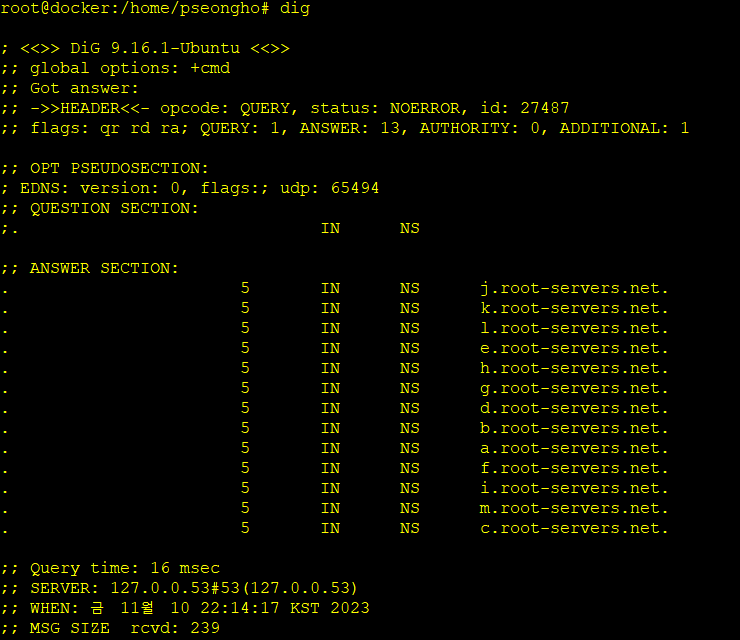
In the screenshot above, you can see that the dig command was entered. This command retrieves the information configured on the name server, which is 127.0.0.53. Name ServerA name server is a server that translates a domain name address into an IP address that computers can understand. When we enter the domain name address of a website we want to visit, we use a name server to find the IP address of that site, and the process actually involves many name servers.
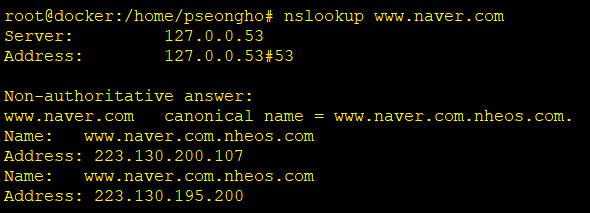
nslookup 도메인이름주소nslookupThere is a command called DNS, which requests the domain name address from a name server to obtain the IP address.
www.naver.com You'll see a canonical tag next to it, which means www.naver.com Think of it as a nickname.
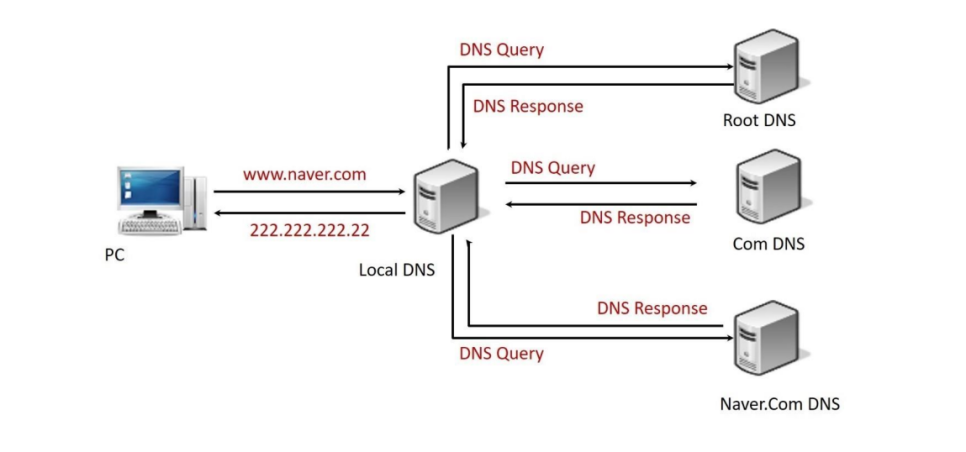
Refer to the Linux and Networking lecture syllabus
※ DNS Spoofing DNS Spoofing) There is an Iranian network attack in which, by exploiting the name server, when a regular user requests an IP address from the name server, the attacker can modify the name server's response to the user. Incorrect IP addressIt is an attack that can be used to redirect users to a fake website and steal their sensitive information.
※ There is a command to find the destination routing path for a specific IP address. In Windows, it is called 'tracert', and in Linux, it is called 'traceroute'. In Linux, you need to install the 'traceroute' package.
※ In addition to the dig command, another way to check the name server is to check the /etc/resolv.conf file. If you ping the name server listed here and it does not work properly, try changing it to Google's name server, 8.8.8.8. If it still does not work properly, there may be an internet problem.
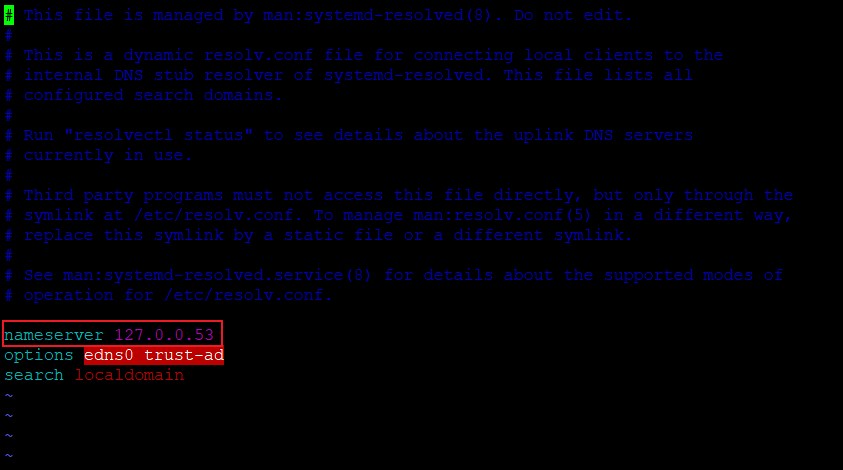
You just need to change the nameserver part in this picture.
The next protocol we will introduce is the Internet Control Message Protocol (ICMP). However, we have talked about it so much that we will continue in the next post...
Reviews
I haven’t uploaded anything in the past few days, because the material I was teaching was difficult, and I wanted to focus on understanding it. In fact, there is so much I missed that I don’t think I could cover it all, but I tried my best to upload as much as possible. I also considered uploading the two-day content of the theory classes, excluding the practical sessions, but... there’s just so much to upload. 🥲 I’m planning to write a part 2, so please look forward to it.