
Let's start with the ICMP protocol at the network layer!
Next post..🫠 I want to learn how to change the network from Host-only, NAT, and Bridge in VMware. (By the way, Tetris???)
Ⅰ. Overview
The network layer ICMP (Internet Control Message Protocol), IGMP (Internet Group Management Protocol)There are protocols. ICMP is a protocol for error messages in the process of sending and receiving packets, and IGMP is a protocol that deals with multicast. Transport layeris large TCP (Transmission Control Protocol)And UDP (User Datagram Protocol)TCP is a reliable connection-oriented protocol based on a 3-way handshake, while UDP is a connectionless protocol that benefits from fast speeds. Network servicesBy NAT (Network Address Translation)Here, it defines the internal IP and the external IP. Next, DHCP (Dynamic Host Configuration Protocol)As explained in a previous post, it defines the way IP addresses are assigned.
Ⅱ. Protocols (focused on the network and transport layers)
Network layer protocols
Following on from the previous post, the network layer ICMP (Internet Control Message Protocol) To explain the protocol, it controls messages between the host server and the gateway (router) and reports errors. There are several typical commands that use ICMP.
ping 10.10.10.2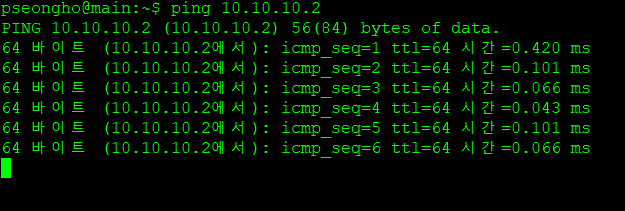
Above ping The address you want to check whether the next connection is established(IP address, domain name address are both possible)When you enter it, you will see a message like the one below when the connection is established normally. If the connection cannot be established normally, an error message will appear. Ping can send a temporary packet to check the response status of the server.
IPSince an unconnected protocol does not guarantee that packets are delivered, it is necessary to inform the sender of the status if an error occurs at a router or node (host) and the packets do not reach their destination. Diagnose the situation of multiple routers receiving ICMP packets and the situation of the destination node. The ICMP protocol operates at the upper layer (transport layer) above the IP protocol, but it also operates on the IP protocol, just like the TCP and UDP protocols. TTL (Time To Live)This is related. The parts to note in the ICMP packet structure are ChecksumThe checksum serves to detect errors in the packet. It calculates the sum of 1, reflecting the carry bit operation, to compute the final checksum.
※ The calculation of checksum and the carry bit operation are not yet understood, so please refer to other posts.
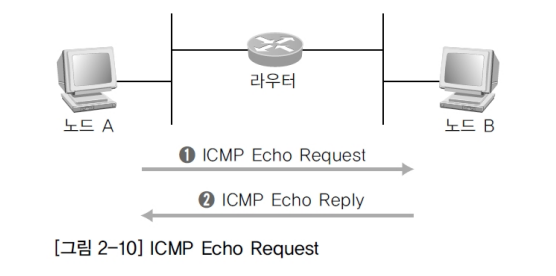
Refer to the Linux and Networking Lecture Outline
ICMP consists primarily of error messages for error notification and diagnostic query messages. ICMP Echo Request The message is used to verify that the transmitting node's transmission packet has arrived at the destination node or router. The transmitting node (the host that sent the request) sends a 'ICMP Echo Request message'transmit it, and receive it from the destination node 'ICMP Echo Reply message'When the reply is received, the packet is recognized as having been transmitted successfully. ICMP Destination Unreachable When the router is unable to send a packet to the destination from a particular node, it sends a message to the sending node. 'ICMP Destination Unreachable message'Send it. 'This includes reasons why the destination was not delivered.' If the router cannot find the IP address path to the destination node, it sends the message back to the sending router. The originating node interprets the message and determines that the packet did not reach the destination.
※ Echois a command in Unix-based operating systems that outputs a string to the terminal. Linux (Ubuntu) is also a Unix-based system, so this command exists, and it is not only used for simple string output, but is also frequently used in shell scripts.
ICMP Redirect messageIf the router is configured with a path that is not suitable for the sending node, it sends a message to re-configure the optimized path to the destination node. ICMP Time Exceeded To prevent packets from circulating indefinitely between networks, using the TTL of the IP protocol, the message is dropped when the TTL reaches 0. 'ICMP Time Exceeded Message'The packet is returned and discarded. Each time the packet passes through one router from the source node, it is reduced by one, and when it reaches zero before arriving at the final destination node, it means that the packet has not been delivered correctly.
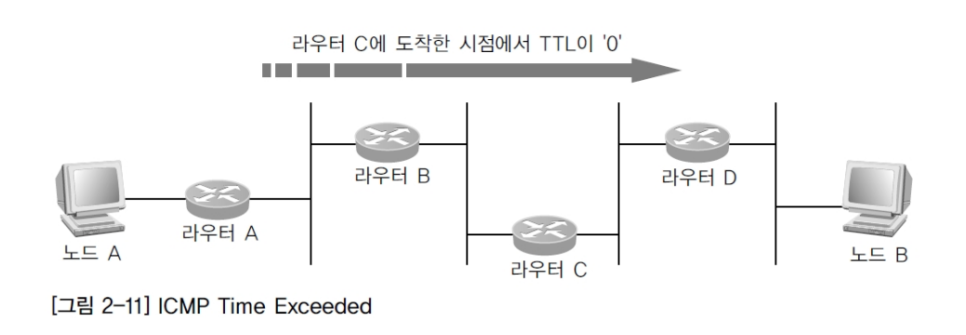
Refer to the Linux and Networking lecture syllabus
ICMP Source Quench When using low-speed wide-area lines, the message is sent from a specific router on the WAN side. BottlenecksThis can occur, and to alleviate this concentration, the transmitter queue value remains '0' and the transmitter becomes unable to transmit. 'ICMP Source Quench Message'The sender node sends this message to the receiving node, which interprets it and controls the amount of transmitted packets because the line is congested somewhere.
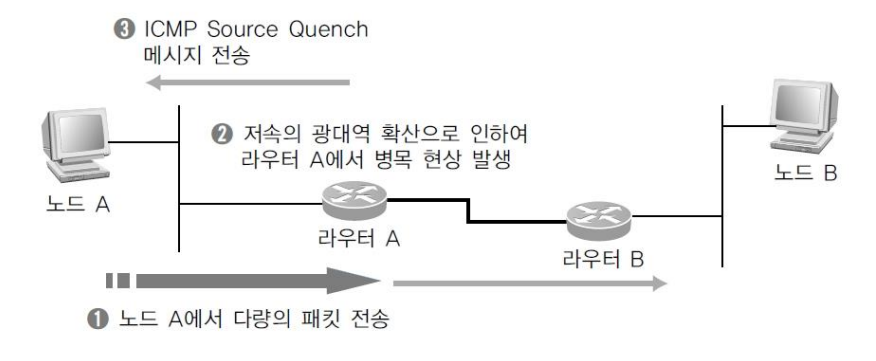
Refer to the Linux and Networking lecture syllabus
※ Low-speed wide area linesIran? It is used as a WAN-scale network for sending voice data, and is used with VoIP (Voice over IP). We recommend that you look up the detailed concept.
Next IGMP (Internet Group Management Protocol)There is a protocol. Multicast groupsBefore we talk about multicast as the protocol that manages it, we need to understand unicast and broadcast. UnicastIt is a one-to-one relationship between one host and another host. All common IP data transfers are unicast. The process of us (ordinary users) accessing Naver or Google is considered to be unicast. Broadcasttransfers data from the host to the entire host on the IP network. Recalling the concept of classes in the IP protocol from the previous post, data is transmitted to all networks in the corresponding class, for example, all devices connected to the switch. A typical broadcast '255.255.255.255'and broadcasting to a specific network Direct broadcastingIn other words, to transmit data to the 211.32.34.0 network range, the destination address is set to 211.32.34.255. This is not a transmission to a specific IP address, but rather a wide-ranging data transmission. The ARP (Address Resolution Protocol) is used when looking up a MAC address, and the DHCP (Dynamic Host Configuration Protocol) is used when dynamically assigning IP addresses. MulticastIt is a hybrid form of unicast and broadcast, where a single host transmits a group of specific hosts. I've bound this particular hostThis is a multicast group, and it is efficient because all hosts in the group receive the data.
2. Transport Layer Protocols
The most important protocol at this layer is TCP (Transmission Control Protocol)And UDP (User Datagram Protocol)Let’s imagine a situation described in a previous post: “Sending a letter to a grandparent in the countryside.” To do this, I would write a letter. The letter would first be written on a small piece of paper with a pen, but then it would be wrapped in stationary and placed in a mailbox. At this point, the letter is a packet, and in the OSI 7-layer model, each layer’s protocol serves to add information to ensure secure message delivery, just as the packet leaves the first physical layer, the LAN card, and enters the mailbox. In this case, the post office would be the gateway (router), and the letter would pass through each gateway and be delivered to its final destination. At the post office, the letter would be stamped with a postage stamp, which would determine whether it would be sent as regular mail or by registered mail for faster delivery. The postage stamp is equivalent to TCP and UDP.
To explain TCP, it is a way for the sender to confirm to the receiver that it has received the packet and knows exactly who the recipient is.(3-way-handshake)It means communicating with each other. So Connection-oriented Known as a protocol, it manages data flow, validates that data is accurate, and communicates. The advantages include high reliability, data control flow, data checksums, timeouts, and retransmissions, but the disadvantage is that the speed may be slow. On the other hand, UDP does not go through the process of receiving a response to confirm that it has been sent and received correctly.(You can request a response, but there is no guarantee that a response will be received.). In that it is just send and done Disconnected-oriented It is a protocol. Since there is no mutual communication between the transmitting system and the destination system, it does not require retransmission even if some data is lost during transmission. Since it is initially unconnected, the lost data information cannot be known. Instead, The advantage is that it is very fast and reduces network load, but data may be lost, and unreliability can be a drawback. Since speed is important, and there are times when real-time operations such as video streaming and gaming are preferred, TCP and UDP can be used depending on the application. It is not possible to say that one transmission method is particularly good.
※ Which of the two transmission methods to choose HeaderYou need to define the behavior.
One of the key concepts in TCP is '3-way-handshake'When the client and server communicate, the client asks the server whether it is okay to connect. SYN (Synchronize)The server that receives it correctly sends a SYN along with ACK (Acknowledgement)The client sends a SYN to the server, and the server responds. The client then connects to the server, sending an ACK back to the server to indicate that the connection is successful. This is step 3. For example, calling a friend's house to check if they are there is step 1, receiving a response that they are there is step 2, and telling the friend who is answering the phone who I am is step 3. The connection is maintained continuously until the call is terminated. Here is a diagram showing this process:
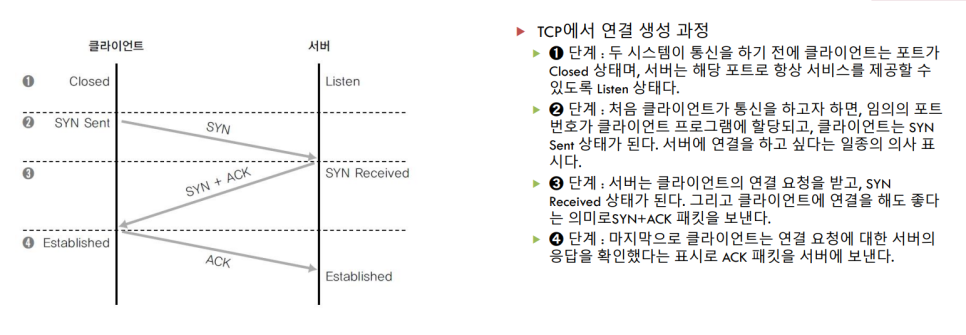
Refer to the Linux and Networking Lecture Outline
This is what happens. When you try to disconnect, FIN (Finish)The client sends a SYN request to the server. The server sends an ACK in response and then sends a FIN. The receiving client sends an ACK back to the server, and the connection is terminated. If we look at this process in a diagram, it looks like this:
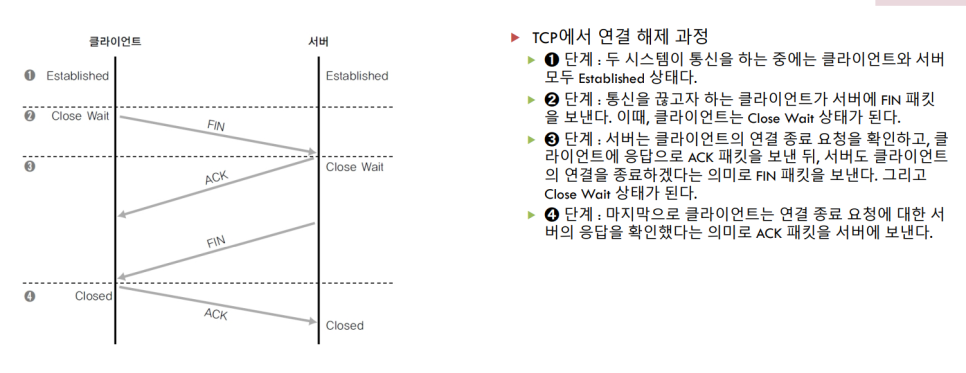
Refer to the Linux and Networking lecture syllabus
This is how it works. Here, SYN is the information about the connection request, and it is included in the TCP protocol portion of the packet. It is incremented by 1 as the connection is established with the connection request and configuration. ACK is the value for the packet sequence of the communication partner. FIN is 1, which means that the TCP connection is being terminated. When the client and server terminate the connection, they include this number in the packet.
※ You may wonder why there is a connection termination process. Service providers that offer large-scale services, such as Naver, have a large number of servers to provide us with seamless service, but the server resources are limited. If we always keep all connections open, it is inevitable that Server resources are limitedto Since it is expected to be used, a shutdown process is necessary to efficiently manage memory by connecting and shutting down whenever needed.
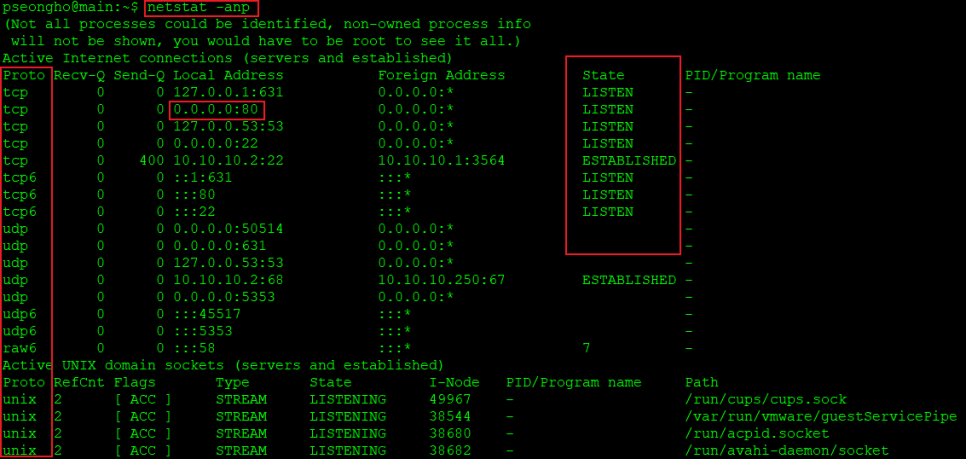
Commands for checking the status of processes or servers running within the operating system 'netstat'There is. Above '-anp'is an option 'a'means the whole 'n'is an IP address, 'p'refers to the process. It describes the client-server connection process that was introduced while explaining TCP's 3-way-handshake. LISTENIt is important to note that LISTEN means that the server is running and ready to respond to external requests, and that it will allow connections when a request is received at the Local Address of '0.0.0.0:80'. '0.0.0.0'The IP address is all that is needed, and right above it, '127.0.0.1' is referred to as the local host. On the left, you can see familiar terms such as TCP and UDP. These indicate how each server is connected, and while we are familiar with TCP and UDP, the number 6 is unfamiliar. The difference between TCP and TCP6 is that they distinguish between IPv4 and IPv6. So while TCP uses the familiar '0.0.0.0' IP address, TCP6 uses the '::1' IP address. ':::'It is written in.
Just as '0.0.0.0' represents all IP addresses, ':::' represents all IP addresses in IPv6. And under LISTEN, ESTABLISHEDYou should see this, which means that the connection was successful. Additionally, in '0.0.0.0:80', the number 80 following the ':' indicates the port number. Port numberThe port number cannot be duplicated on any of the multiple servers that are currently running on the operating system. That is, only one port number is allowed for each service. Usually, all services on a website use the default port number 80, and for each protocol, the default port is specified for each server. Protocol port numbers are defined from 0 to 40. Clients also have port numbers, which are automatically assigned by the browser when connecting. If the IP address is not visible at the bottom, it means that there are processes running inside the operating system. If you can see 'unix' on the leftmost side, this means that these processes are internal processes. There are many processes with 'unix' in Linux, and there are also many internal processes that run when Windows is booted. If you know the startup programs, it will be easier to understand. These are processes that perform shared folder functions, display the Windows screen, or make it easier to control with the mouse or keyboard. In Linux, these processes are the parts that appear as 'unix'.
※ If the service is running normally and you are accessing the correct port number, but you cannot access the server, check the firewall!
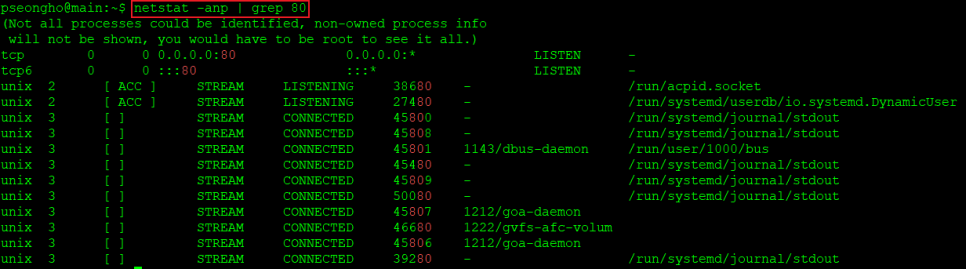
※ This is related to the characteristics of Linux commands. '|' With this pipe symbol, it is possible to execute a sequence of commands. So, if you add the '|' symbol after the netstat -anp command and enter the search command grep and the search term, it will output only the relevant servers or processes that are running.
Since we've already discussed the process, let's take a closer look at the related commands: 'ps -ef'There is an option 'e' that shows all process information, and 'f' that shows more detailed information.
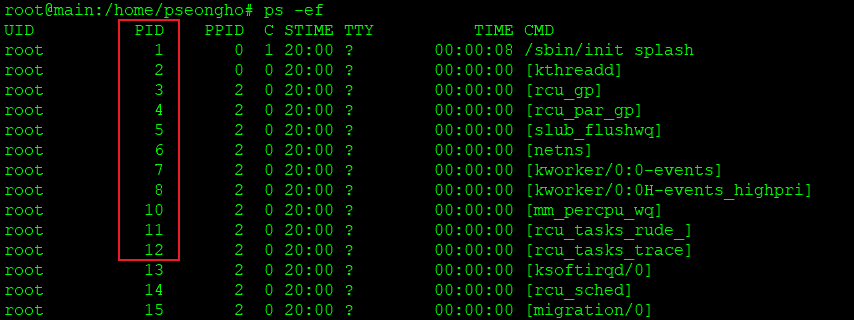
If we know the PID, we can use a command to terminate the process. 'kill -9 process ID'If you enter it, you can terminate the process, and the '9' option forces it to shut down.
※ 'w' You can also check the connection information using the command line!
Ⅲ. Network Services
NAT (Network Address Translation)
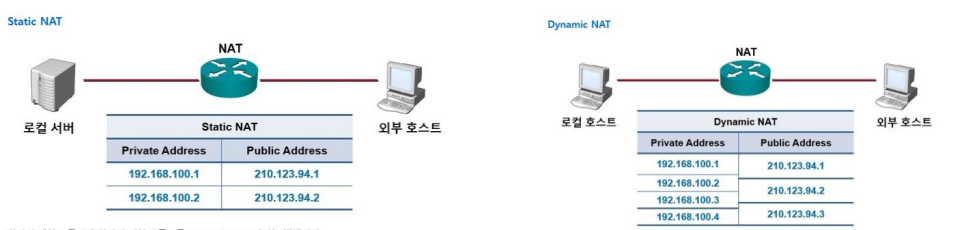
Earlier, when we first published the network, we talked about internal IP and external IP. Internal IPis an IP address shared between the same devices connected through the router External IPwas the IP address needed to access external services such as Naver and Google. This internal IP address was converted to an external IP address. MappingThere is a way to do this, and that is NATNAT maps one internal IP address to one external IP address on a one-to-one basis. Static NATand dynamically mapping multiple internal IP addresses to multiple external IP addresses Dynamic NATStatic NAT is used because the address to be changed is already specified, and it is known that the internal IP is the external IP, so communication is possible from the outside to the inside. Therefore, from the perspective of providing services, when accessing the server from the outside with an external IP address, the server must be connected and the service must be provided. On the other hand, Dynamic NAT creates an external IP pool and dynamically maps unused IPs. If the number of external IPs is less than the number of internal IPs, mapping cannot be done one-to-one, so this method is used. Since the number of external IPs is less than the number of internal IPs, if an external IP is already in use, it cannot be mapped to another private (internal) IP from the outside.
DHCP (Dynamic Host Configuration Protocol)
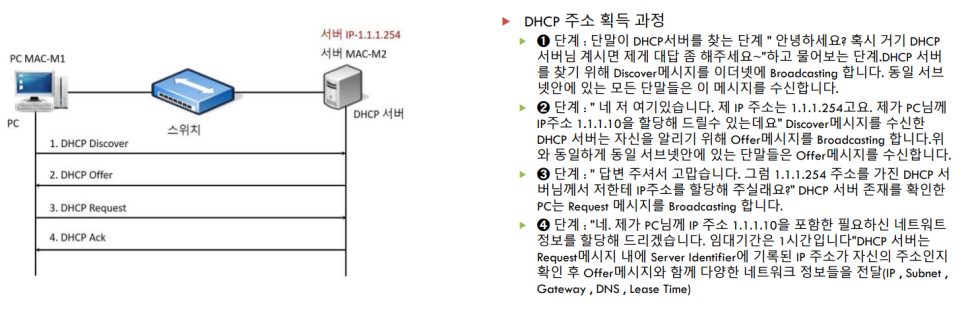
DHCP serverAs we have explained before, a DHCP server is responsible for requesting and assigning IP addresses to specific devices (or multiple devices) so that they can belong to the same network. For example, if you use a laptop to connect to a cafe’s WIFI, the DHCP server will be used during the connection process. BroadcastingIt asks the DHCP server to provide its IP address and the IP addresses it can allocate. Since this is a broadcast process, all devices on the same network can receive the message. Once it knows the IP address it can be assigned, it requests that the DHCP server allocate it. The DHCP server then allocates the address and returns it to the requesting device. Network informationIt passes this information. To illustrate this process, here is a diagram:
Reviews
We covered networks, network types, the 7 layers of OSI, data links, networks, and protocols at the transport layer for almost half a day. There is still so much I haven’t covered, and I’m reminded once again that networking is a huge field. 😔 It’s a shame, but it’s not something I can fully understand and memorize in a short amount of time. I’m going to be satisfied with this and continue to study and fill in the gaps. 🙂