
Ⅰ. Overview
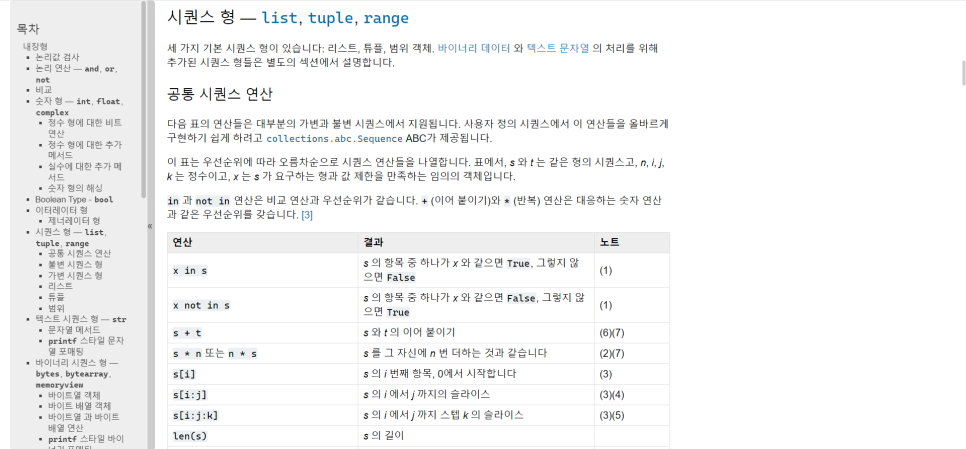
In Python CollectionsThis includes, for example List, Tuple, DictionaryThere are lists, tuples, and dictionaries. A list is a collection of data in a sequential order. Any data type is possible. A tuple is similar to a list, but it can only be read. A dictionary is a collection of data in the form of keys and values. Lists, tuples, and dictionaries have useful functions that support operations such as adding, deleting, modifying, length, and searching. Functions perform specific operations, much like magic boxes. In Python, FunctionsA function can have parameters and return a value. There are concepts of local variables and global variables that apply to functions. Local variables only affect the function, while global variables can be shared by multiple functions.
Ⅱ. Python Lists
In Python ListTo understand Stack, Queue, DequeueYou don't need to understand these concepts perfectly, but once you've used them a few times, you'll be able to use them right away. Since many concepts can be covered with just a basic understanding of stacks, queues, and deques, we'll skip over them here. You can easily find detailed explanations on other blogs or posts, so we recommend that you check them out at least once.
The stack is Backward exit (Last In, First Out (LIFO) When data enters the structure, it is stacked on top, and when the data is retrieved or utilized, the data that was entered last is processed first. The queue First In First Out (FIFO)It differs from a stack in that the first data entered is the first data to be output. D-CUY compensates for the shortcomings of a linear queue by ensuring that data is entered and output in the correct order. You can insert and remove data in any order. You can choose to remove the first data entered or the last data entered.
In Python, a list can be used to group multiple data items, regardless of their data type. For a simple real-world example, when several students are gathered in a class at school, the class is the overall container that holds the students, and the students are the individual containers. In this case, the list is the class, and the students are the data. IndexJust as a student has a unique student ID number, data created in a list has a number that indicates its position among the other data.
※ Note that the index numbers start at 0, not 1. This is related to the fact that computers run programs in machine language, which is based on 0 and 1.
When creating a list
list = []
list = [1, 2, 3, 4]
It can be created in this form. In the example above, the list is empty and has no data yet. In the example below, the list contains four numbers. In this case, the first data index is 0, the value is 1, the second is 1, and the third is 2. ··· In this way, each index number is matched with data. The list can take various forms, such as
Programming languages and Python (variables, operators, data types)
As you can see from the previous post, all four data types—integer, float, string, and boolean—can be made into lists.
※ A distinctive feature of Python is that it has data types in addition to the basic ones. Tuples, dictionaries, and other data structures learned after lists also contain a single data item.You can enter as well!
In this way, all data types can be converted to lists, and there are two ways to access the data in these lists: either by using the index number directly or by using a loop.
list = [1, 2, 3, 4]
print(list[0])
결과 출력 ==> 1

for i in list :
    print(i, "", end="")
결과 출력 ==> 1 2 3 4
※ This is another peculiarity of Python. Addition and multiplication in a listYou can add two lists together, or multiply one list by a specific number to create a list with repeated data.
list1 = [1, 2, 3]
list2 = [4, 5, 6]
print(list1 + list2)
결과 출력 ==> [1, 2, 3, 4, 5, 6]

print(list1 * 2)
결과 출력 ==> [1, 2, 3, 1, 2, 3]
Data in the list ChangeIt is also possible to use the index number when doing so.
list = ['a', 'b', 'c']
list[1] = 'd'
print(list)
결과 출력 ==> ['a', 'd', 'c']

list[2:3] = ['e', 'f']
print(list)
결과 출력 ==> ['a', 'd', 'e', 'f']
Python is unique in that it can specify ranges, rather than using just one index number. In the example above, the number before the colon specifies which data item to start with. Initial valueAnd the numbers behind it Up to how many data It represents an index. The range() function works in a similar way to the for statement. If you don't specify a starting value, the first data is specified, and if you want to specify data in reverse order, -1, -2 ··· You can use it.
There are functions for adding or deleting data from a list, changing the number of items, sorting, reversing, and copying.
list = [1, 2, 3]
list.append(10)
print(list)
결과 출력 ==> [1, 2, 3, 10]

list.insert(1, 20)
print(list)
결과 출력 ==> [1, 20, 2, 3, 10]
These two functions are used to add data to the list. append()In this case, it adds data to the end insert()In this case, it takes two arguments: the first is the location where the data will be inserted, and the second is the data itself.
list = [1, 2, 3, 4, 5]
del(list[0])
print(list)
결과 출력 ==> [2, 3, 4, 5]

del(list) ==> 리스트를 통째로 없앰

list = [1, 2, 3]
list.remove(2)
print(list)
결과 출력 ==> [1, 3]

list = [1, 2, 3]
list.pop()
3
print(list)
결과 출력 ==> [1, 2]del()And remove()The del() function is a function that deletes data from a list. In the case of the del() function, you can delete the data of a specific item or delete the entire list. The remove() function deletes only the specific data contained in the list, and if there are multiple duplicate data, it deletes only the first one it encounters. pop() For functions, it returns the last data in the list and deletes the data.
count() The function is simple: if you provide the data you want to find as an argument, it will tell you how many items of that data there are. list.count(search_value)You can use that.
list = [1, 4, 2, 5, 3]
list.sort()
print(list)
결과 출력 ==> [1, 2, 3, 4, 5]
When you want to sort a list that is not in order sort() It uses a function. By default, it is sorted in ascending order, and if you pass sort(reverse=True) as an argument, it is sorted in descending order.
※ When you actually study, Sorting algorithmsYou can get a mission to implement it. It's very difficult, but it's helpful. There are several sorting methods, each of which takes different amounts of time to sort, including bubble, quick, and others. It's also fun to try creating algorithms using conditional statements and loops. I recommend it.
list = [20, 10, 40, 50, 30]
list.reverse()
print(list)
결과 출력 ==> [30, 50, 40, 10, 20]

list = [1, 2, 3]
copyList = list.copy()
print(copyList)
결과 출력 ==> [1, 2, 3]
reverse() The function reverses the data positions, starting from the last data in the list. copy() The function copies the list into a new list. As in the example above, the newly copied list can be stored in a new variable.
※ The important concepts to keep in mind when copying a list are Shallow CopyAnd Deep CopyThere are already many good articles that introduce this concept. In short, shallow copying only copies the address values of the existing list, so if either the newly copied list or the existing list is changed, they are changed together. Deep copying, on the other hand, copies only the actual data of the existing list to a new memory space, so it is not affected by data changes.
If the concept of a list is understood 2D ListIt's good to know.
list = [[1, 2, 3], [4, 5, 6], [7, 8, 9]]This is a structure of this type, and to utilize this list, we need to use nested loops. It can be used in many ways, but we recommend that you practice this concept thoroughly. When calling specific data in this 2D list, the index numbers are 2, and we can call it like this: 'list[0][1] = 2'. To understand 2D lists, Mathematical matricesIt's good to know. And once you can make good use of 2D lists, 'Tetris' You can also create your own games. Since the difficulty may be high at first, we recommend that you study the books or other blogs thoroughly before attempting it!
Ⅲ. Python tuples
TupleIs not writable in the list Read-only listIt's easy to think of it that way. The other properties are the same, and the functions used in the list are del() Only functions are possible, but you cannot delete a single data point; you can only delete the entire list. Later ConstantsIt's good to study the concept. 'Initially, the value assigned to a variable remains unchanged and is a constant'You can think of a tuple as a list of constants.
tuple1 = (1, 2, 3)
tuple2 = 1, 2, 3

tuple3 = (10,)
tuple4 = 10,
A tuple must specify data when it is created. That data does not change and is maintained throughout its lifetime, unlike a list. '()' parenthesesUse the list. '[]' bracketsYou can use it to create a tuple with only one data, as in the example above, by adding a comma after the data. ', (comma)The tuple must be enclosed in parentheses. Like a list, it can be accessed by index number and can be added and multiplied!
※ In addition, there are functions that can be used with lists and tuples that convert each other. They convert lists to tuples and tuples to lists, and when you want to convert to a list, list(tuple), when you want to convert to a tuple tuple(list) You can use it this way.
IV. Python dictionaries
DictionaryWhen you think of a dictionary, two pairs form one data item, one being the key and the other being the value.
dict = {'a':1, 'b':2, 'c':3}
dict = {1:'a', 2:'b', 3:'c'}
When creating a dictionary, as in the example above '{}' curly bracesYou can use any data type for the key. However, keys cannot be duplicated. And unlike the list, OrderThere is none.
dict = {1:'a', 2:'b'}
print(dict[1])
출력 결과 ==> a
The list accessed data by index number, but the dictionary Accessing data in kilobytesIf you put the key in brackets, as in the example above, the corresponding value will be returned. When adding data to a dictionary, 'dict[key] = value'You can assign values in the form of key-value pairs, but if you insert duplicate keys, the previously existing value is deleted and replaced with the newly assigned value. When adding values, it is always necessary to assign them as a pair of key and value, just like in a list. del() You can delete it using a function.
dict = {'가수':'트와이스', '인기곡':'Cheer Up!', '데뷰':'서바이벌 식스틴'}
print(dict.keys())
결과 출력 ==> ['가수', '인기곡', '데뷰']
print(dict.values())
결과 출력 ==> ['트와이스', 'Cheer Up!', '서바이벌 식스틴']
print(dict.items())
결과 출력 ==> [('가수', '트와이스'), ('인기곡', 'Cheer Up!'), ('데뷰', '서바이벌 식스틴')]
Useful functions in the dictionary keys(), values(), items()The keys() function returns a list of only the keys in the dictionary. The values() function returns a list of only the values, and the items() function returns a list of key-value pairs in the form of tuples.(It's like a 2D list!)Import it.
※ You've seen this phrase before inThere is this. It can be used not only in dictionaries, but also in conditional statements, loops, and so on, as the opposite of in. not inThere is also the simple 'data in list, tuple, dictionary, range()' function, which checks whether data exists in a set created by a list, tuple, dictionary, or range() function. not in, on the other hand, checks whether something does not exist.
V. Python Functions
Functions were briefly mentioned in the previous post, where they take parameters and perform a specific action after returnIt is a structure that returns a value. For a simple real-world example, it is easy to understand if you think of a vending machine that dispenses a drink when a coin is inserted.
def func1() :
    동작 구조
def func2() :
    동작 구조
    return 값
We define a function in this form, and it is largely When there is no return value and when there is a return valueThere is. If there is a return value You can insert values corresponding to a specific variable, pass them as parameters to other functions, perform calculations, or use them in various ways. If there is no value to returnA function ends after the operation is executed, and it is the most commonly encountered function. print() There are functions. Basic built-in functions in Python, such as print(), len(), and count(), are also useful, but when you actually code, you will find that Custom functionsThis results in different functions being created for each user, leading to a wide variety of function behavior structures.
The function ParameterIt can either receive and operate on the data or not receive it and process the data it receives and return it afterwards.
def add(x, y) :
    result = 0
    result = x + y
    return result
By default, you can create this structure, as shown in the example above. 'Add'is a function that performs
※ Once you study the functions, Creating a programBecause the code will be very long, I would like to give you a tip on a good structure for writing the program. '1. The function definition section comes first. 2. The global variable declaration section comes next. 3. The main program logic code section comes next.' Global variables are explained in detail, and explaining how they work as comments or what variables they are can help in understanding the code. While it is not necessary to follow this structure, it is recommended to practice leaving comments and following this structure in advance, as it can be very difficult to maintain code that is hundreds or thousands of lines long.
For the sake of learning, I leave one more mission. The example below was written by solving the mission and considering exceptions and structures. As mentioned earlier, the structure of a function's behavior can be very diverse, so the example below is not the correct answer. I hope you write better code!
Mission: Implement a calculator using functions
# 더하기
def add(x,y) :
	return x + y

# 빼기
def sub(x,y) :
	return x - y

# 곱하기
def multi(x,y) :
	return x * y

# 나누기
def div(x,y) :
	return x / y

# 입력
def inputNumber() :
	num = 0
	while True :
		num = input("숫자 입력 : ")

		if not(num.isdigit()) :
			print("숫자를 입력해주세요.")
			continue
		else :
			break

	return int(num)

# 계산입력
def inputSign() :
	sign = ''

	while True :
		sign = input("계산 입력 ( +, -, *, / ) : ")

		if sign not in ('+', '-', '*', '/') :
			print("제대로 된 계산을 입력해주세요.")
		else :
			break

	return sign

def control() :
	sign = inputSign()

	x = inputNumber()
	y = inputNumber()

	mark = {"+":add(x,y), "-":sub(x,y), "*":multi(x,y), "/":div(x,y)}

	result = mark[sign]

	print(f"## 계산기 : {x} {sign} {y} = {result}")

def main() :
	while True :
		print("계산기 작동")
		exit = int(input("진행1, 종료2 : "))

		if exit == 2 :
			break

		control()

main()
There is a peculiarity of Python with regard to function parameters. The number of parameters does not matter in any language, but in Python Default values for parametersYou can specify it.
def add(x, y, z = 0) :
    result = 0
    result = x + y + z
    return result

print(add(4, 5))
결과 출력 ==> 9
If the original function has three parameters, you must provide all three data, but if one of the variables has a default value, as in the example above, you can omit the other two. Even if you only input 2 data, the function will work properly.One additional thing to note about parameters is that when calling a function, "That's running the function." You must accurately pass the data according to the number of parameters in the function, and if the number of parameters changes, you must create a separate function.
※ The data type of the parameter can be anything!
def func1(x, y) :
    result = x + y
    return result

def func2(x, y) :
    result1 = x + y
    result2 = x - y
    return result1, result2

sum, sub = func2()
As in the example above, one of the features of Python functions is that they perform specific actions. The returned data may be multipleIf func1() is a basic 'addition' function, then func2() receives the same data, but it becomes a function that can perform both 'addition' and 'subtraction'. Of course, if the return value is more than one, the receiving variable must be adjusted accordingly.
def myFunc() :
    pass

if True :
    pass
There are keywords that can be used in functions, conditional statements, and classes to be executed later. 'pass'In other words, it means declaring a class or function to be implemented according to the program plan and defining it later. It is useful to leave it as a comment, but it is also useful when assigning it according to the role of implementing tasks or functions, while keeping the entire logic intact.
※ Functions are also allocated memory space. They have an address value, and when they are returned, the function is terminated and deleted from memory space at the same time. This is something that you don't have to worry about in simple programs, but for large-scale programs, it's good to think about the role and operation of functions for good code. Especially, there are times when errors occur or the program is terminated due to memory leaks through loops and recursive functions.
The last concept to understand in the function is Global variablesAnd Local variablesThat is.
def func1() :
    a = 10
    print(a)

def func2() :
    print(a)

a = 20

func1()
func2()
If you look at the code above, it prints the variable a in the same way. However, in the func1() function, a is defined, but in the func2() function, it is not defined. In this case, how will the variable a be displayed when the two functions are called and executed?
func1()
출력 결과 ==> a = 10
func2()
출력 결과 ==> a = 20
The result is that the func1() function calls the a variable that is declared and defined within its own function body, while the func2() function refers to the a variable that is declared as a global variable. A variable declared and defined within a function is a local variable.and several functions Global variables are the ones that can be shared commonly.That is. Then why doesn't the func1() function refer to the global variable a?
The answer is that local variables are more powerful than global variables. FirstThis is because functions are also allocated memory space as mentioned earlier. The function executed within the allocated memory space includes the variable a. Therefore, you can call your own local variable directly, but in the case of the func2() function, there is no variable a in its allocated memory space. However, the code requires a call to the variable a, so it finds the variable a within the scope it can refer to. As a result, the global variable a could be output.
※ A keyword that allows a global variable to be directly referenced in a function 'global'However, you can reassign global variables imported from the global namespace.
def func1() :
    global a
    a = 10
    print(a)

def func2() :
    print(a)

a = 20

func1()
출력 결과 ==> a = 10
func2()
출력 결과 ==> a = 10
The difference from the above example is that the func1() function imports a global variable as global. ReallocateThat's all I did. The important thing is that if I hadn't declared global, it would have acted as a local variable, but since I declared that I wanted to use it as a global variable, it was re-assigned as a global variable. This is something to be aware of, because in the case of global variables, other functions can be referenced depending on the program's functionality, so the data can change. Causes malfunctionYou can. That's why you should be careful when using the global keyword.
Reviews
Today, I studied lists, tuples, dictionaries, and functions. I have been learning Python more and more, and I have been able to create various programs (calculators, lotteries, etc.) and perform various missions. However, even though I have learned these concepts before, I think they are very difficult for those who are new to Python. I remember that it took me a long time to get used to them, and there are many things that I did not cover in this article. So, if you are reading this article, I would like to recommend that it is difficult and requires a lot of study, and it is not because you cannot do it! 🫠 I still feel that I cannot use it properly, so I would appreciate it if you consider this article as a light introduction. 😁